Boost Kitchen Efficiency with the WaiterOne Status Board
In the fast-paced world of hospitality, timing and communication are everything. That’s why we’re excited to spotlight a feature in WaiterOne’s Kitchen Display System (KDS) that’s transforming back-of-house operations: the Status Board.
What Is the Status Board?
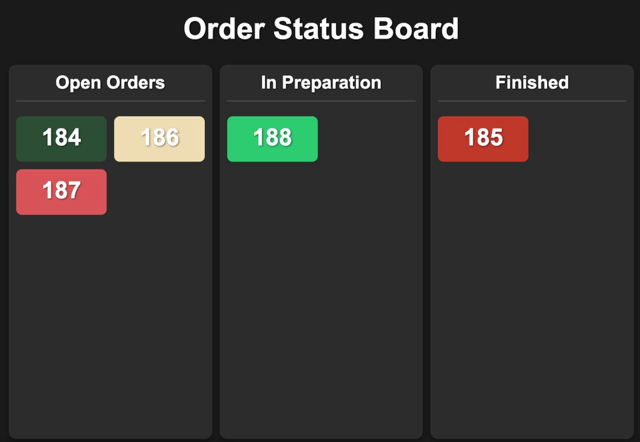
The Status Board is a live dashboard within WaiterOne’s KDS that gives a real-time overview of all active orders. Designed with both speed and clarity in mind, it displays each order as it moves through the preparation pipeline — from “In Preparation”, to “Ready”, and finally to “Completed”.
It’s a visual command center that keeps everyone — chefs, waitstaff, and even front-of-house managers — on the same page.
Why It Matters
Without a centralized system, orders can easily fall through the cracks. Waiters might ask the kitchen for updates. Chefs might have to pause their workflow to give answers. Customers might wait longer than necessary. But with the Status Board:
- 🧑🍳 Kitchen staff can focus on cooking, while tracking progress without the need for paper tickets or verbal confirmations.
- 👩💼 Restaurant managers get a clear, live view of operations — even from the dining room.
- 🍽️ Clients receive their food faster and fresher, with fewer delays and mix-ups.
Real-Time, Real Simple
As orders are received in the kitchen (whether from a waiter using the WaiterOne POS or a self-ordering iPad at the table), they instantly appear on the Status Board. Once a dish is prepared, kitchen staff can tap to mark it “Ready”, signaling the front-of-house team to serve. When the dish reaches the customer, the status moves to “Completed”.
It’s fast. It’s clear. And it reduces the need for spoken communication during peak hours — helping everyone stay focused and efficient.
Benefits at a Glance
- ✅ Fewer mistakes: Everyone sees the same order status, reducing the chance of missed or repeated dishes.
- ✅ Faster service: Orders are prioritized and served without delay.
- ✅ Smarter communication: No shouting across the kitchen — just a glance at the screen.
- ✅ Customer satisfaction: A smoother workflow means a better dining experience.
Ready to Upgrade Your Kitchen?
If you’re already using WaiterOne, activating the Status Board on your KDS is a simple and powerful way to streamline your kitchen workflow. Whether you’re running a cozy café or a high-volume restaurant, this feature can help you serve faster, smarter, and with more confidence.