Author: Eddy I. F. Van Hoeserlande

  • What exactly is a hospitality cash register system?

    A full lunch shop at 12.15 pm is often the moment when you immediately notice whether your cash register cooperates with you or works against you. Orders have to go to the kitchen quickly, tables have to beat, staff are not allowed to search and at the end of the day you just want to know what has been sold. That’s exactly where the question begins: what is a hospitality checkout system?

    A hospitality cash register system is the central system with which you enter orders in your business, manage accounts, process payments and keep a grip on your daily operations. So it is much more than a digital replacement for an old-fashioned cash register. In practice, it is the point where service, bar, kitchen, management and reporting come together.

    What is a hospitality cash register system in practice?

    In a store, checkout is often the main task of a cash register system. In the hospitality industry, it is different. There, the process usually begins when taking an order at the table, at the bar, at a collection point or via a kiosk. That order should immediately end up in the right place, for example on a kitchen screen or at the bar, without notes lying around or misunderstandings arising.

    A good hospitality cash register system helps you with the entire route from order to payment. It records what is sold, at what time, by which employee, on which table or in which sales channel. At the same time, it makes reports, tracks sales and provides insight into your busy moments, best-selling products and team performance.

    That’s also where the difference is with a simple cash register app or standard payment system. A real hospitality cash register system is built for pace, crowds and multiple processes at the same time. That makes it relevant for restaurants, cafes, lunchrooms, food trucks, ice cream parlors and festival concepts.

    Which functions belong to a hospitality cash register system?

    The basics are simple: you want to be able to order and pay. But in the hospitality industry, the practice is just a little less simple. Splitting a table, putting a round on the bill, passing a product without onion to the kitchen or immediately seeing which tables are still open – these are functions you need on a daily basis.

    Most modern hospitality cash register systems therefore offer features such as table management, mobile order recording, linking to kitchen or bar, different payment methods, reporting and user rights for employees. Often there are also inventory management, pick-up and delivery options, reservations and customer orders.

    Not every company needs everything. A food truck has different requirements than a restaurant with a large terrace. An ice cream parlor wants speed at the counter, while a bistro has a lot of table management and aisle system. Therefore, the best question is not only what a hospitality cash register system is, but also what your business should be able to do with it every day.

    Order, pass on and pay without detours

    The core of a good system is speed. Employees must be able to enter an order directly on an iPad, iPhone or fixed cash register. That order must be visible in the kitchen or at the bar without additional actions. After that, payment should go just as smoothly, whether per table, per person or partly cash and partly pin.

    If a system is slow or cumbersome at this point, it costs immediate turnover and rest. Especially at peak times, you don’t want menus that are too deep hidden or screens that staff have to click through as if they were filling out a tax form.

    Insight into your case

    A catering cash register system is also a steering instrument. You can see what’s going fast, when it’s busy, which articles make margin and where processes get stuck. This is useful for large chains, but also for smaller entrepreneurs who need to focus on costs and staff deployment.

    With good reports, you have to do less on feeling. You can see faster if a lunch deal works, if Sunday afternoon is really profitable and which employee makes a striking number of corrections. That kind of insight helps to adjust faster.

    Why are hospitality businesses switching to modern cash register systems?

    Because old systems are often expensive, cumbersome and limited. Many entrepreneurs remember it: closed hardware, high purchase costs, additional licenses per device and a phone call to a supplier for every small change. That model is less and less suited to hospitality that wants to work flexibly.

    Modern hospitality cash register systems often run on well-known hardware such as iPads and iPhones and work cloud-supported. That makes them more mobile and usually easier to use. New employees need less explanation and expansion is faster. For a terrace, extra point of sale or event, you don’t have to go straight into a completely new route.

    That doesn’t mean every modern system is automatically good. Some solutions look sleek, but lack features that are crucial in practice. Other systems are cheap in the base, but add so much per device, per module or per additional screen that the advantage quickly disappears. That is precisely why it pays to look beyond just the entry price.

    What should you pay attention to when choosing one?

    The first test is simple: does the system connect to your way of working? Not on a demo situation, but on a busy Friday night, a full terrace or a takeaway moment when everything happens at the same time.

    Look at ease of use. Can staff work with it quickly without long training? Is the screen logically arranged? Can you easily customize products, tables and price groups? The faster your team can get along with it, the fewer errors and delays you get.

    Also pay attention to the total cost. Not only the subscription price, but also hardware, installation, support and any surcharges for additional devices or features. A system that seems cheap can still be expensive in a year.

    Reliability is at least as important. A catering cash register system must remain stable, especially during crowds. Therefore, ask how the system handles internet outages, updates and support. You don’t want a supplier who is mainly available at times when you are closed.

    Does it suit your type of hospitality?

    Not every system is equally suitable for every concept. A quick service business wants as few actions as possible per order. A restaurant needs table plans, courses and bill splitting. A festival concept wants to be able to scale up speed, multiple points of sale and temporarily.

    That is why industry-specific practical experience is important. A supplier who really understands the hospitality industry builds functions based on use in the business, not just based on technology. You notice that in small things that are big in practice.

    What does a good hospitality cash register system yield?

    The biggest advantage is usually not technical innovation, but rest in the operation. Less miscommunication between service and kitchen. Fewer errors on receipts. Faster checkout. Less time spent on research after closing.

    In addition, it often provides an immediate financial benefit. Faster turnaround time means more order processing. Better insight means smarter shopping and planning. And if you don’t have to make a high investment in expensive, closed hardware, there’s more room for the business itself.

    For many entrepreneurs, profit is also in flexibility. You can scale more easily, add additional sales channels, or customize processes as your concept changes. That is useful if you have seasonal crowds, temporarily run a second location or want to start with takeaway, kiosk or customer orders.

    What is a hospitality cash register system worth if it works really simply?

    More than entrepreneurs sometimes think. A system is often judged on functions, but in practice it is all about workability. If staff enter orders quickly, if the kitchen immediately sees the right information and if you can view reports without hassle, you will notice the difference every shift.

    That is precisely why many hospitality entrepreneurs no longer choose the toughest or most expensive solution, but a system that can do a lot without becoming complicated. That is also the reason that platforms such as WaiterOne are gaining ground: a lot of functionality, clearly priced and built for how hospitality really runs.

    The core: it should make your business easier

    The best explanation for the question of what is a hospitality cash register system is ultimately very practical. It is the system that ensures that ordering, passing on, checkout and managing do not pass each other by, but together form one working process.

    If you still work with an outdated cash register, loose notes, unclear reports or a system that doesn’t really make anyone happy, that’s usually not a minor inconvenience. It slows down your surgery a bit every day. And in the hospitality industry, that’s all that counts.

    So don’t choose the system with the longest feature list, but the system that immediately saves time on the floor, gives an overview and remains affordable. That really helps you on a busy Saturday night.
  • 5 Invisible Ways Legacy Cloud POS Systems Are Draining Your Restaurant’s Profit Margin

    Choosing a restaurant point-of-sale (POS) system used to be simple: you bought a piece of hardware, paid for it once, and used it until it broke. Today, the SaaS (Software-as-a-Service) model has taken over, promising “cloud flexibility” but often hiding astronomical long-term costs.

    For high-volume restaurants, bars, food trucks, and event venues, these hidden costs can quietly destroy your bottom line. If you are using a cloud-dependent system that charges per-device licensing fees or forces you into proprietary payment processors, you are leaking cash.

    Here is a look at the data showing how legacy cloud systems drain profits compared to a local-first, native architecture like WaiterOne.

    Quick Comparison: Cloud-Dependent SaaS vs. Local-First Native POS

    Cost & Operational VectorTypical Cloud-Dependent SaaS POSWaiterOne Local-First Native Architecture
    Monthly Cost (Per Device)$79 – $150+ per terminal / handheldFlat ~$24 (€20) flat rate for unlimited devices
    Offline PerformanceMicro-outages freeze transactions; data synced post-crash100% operational offline; local SQL database handles traffic
    Payment Processor Lock-inMandated proprietary processor (high interchange markups)Total freedom (SumUp, Zettle, etc. with zero hidden penalties)
    Hardware OverheadProprietary Android/Linux terminals or expensive enterprise rigsPremium Apple Ecosystem (iPad, iPhone, iPod Touch)
    Data Privacy & ControlYour customer metrics live on a third-party serverYour data is stored locally on your device, backed up securely

    The 5 Hidden Profit Drains in Your POS Architecture

    1. The Multi-Terminal “Success Tax”

    Most cloud POS companies charge you per active terminal or mobile ordering device. If your restaurant grows and you need to deploy three extra iPads for your servers during peak patio season, your monthly software bill doubles or triples.

    The Solution: WaiterOne utilizes a flat-rate model (~$24/month) that allows you to connect an unlimited number of devices (iPad main server, iPhone remotes, and Kitchen Display Systems) to your local network without paying an extra cent in software licensing.

    2. Network Latency and Internet Dependency

    A pure web-app POS forces every single button tap, modifier change, and table transfer to travel to a remote cloud server and back. When your venue gets busy or the local Wi-Fi stutters, your staff experiences micro-lags. If the internet drops entirely during a festival or a storm, your business grinds to a halt.

    3. Forced Payment Processing Markups

    Many mainstream POS platforms lure owners in with low upfront hardware costs, only to legally lock them into proprietary payment processing. They inflate your transaction fees or penalize you with an extra “monthly software fee” if you try to use an independent merchant account.

    4. Excessive Kitchen Paper Waste

    Traditional systems require physical kitchen printers running continuous network cables across hot lines. Not only do paper costs add up to hundreds of dollars annually per station, but lost physical tickets cause severe friction between the front of house and line cooks.

    5. Hardware Obsolescence Cycles

    Cheap proprietary POS tablets often suffer from poor build quality, slow response times, and limited security updates. Moving your workflow to Apple’s native ecosystem ensures structural stability and incredibly fast touch responsiveness.

    Technical Architecture Breakdown: Why “Local-First” Outperforms “Cloud-Only”

    To understand why a native setup is inherently faster and more reliable, it helps to look at the underlying data structure:

    • The Local SQL Core: Instead of acting as a glorified web browser that breaks when internet connections fluctuate, your main iPad runs a dedicated, embedded SQL database. It processes transactions instantly at local network speeds.
    • Peer-to-Peer Syncing: When a server enters an order on an iPhone via WaiterOne Remote, the data routes directly to the central iPad over internal Wi-Fi. It bypasses the public internet completely.
    • The Hybrid Cloud Dashboard: The system only utilizes the cloud for what it’s actually good for: real-time remote monitoring, automatic off-site backups, and menu updating while you are away from the floor.

    Action Plan: Migrating Without Disrupting Your Service

    Transitioning your point-of-sale system does not have to mean closing your doors for a training day. Because a local-first system runs on standard Apple hardware, you can easily shadow-test it alongside your current machine.

    1. Audit Your Current Hardware: Check if your existing network setup uses standard ESC/POS compatible thermal printers (like Epson, Star Micronics, or Citizen). If so, you can typically keep using them.
    2. Build Your Menu Locally: Download the application onto a central iPad. Build out your modifier groups, happy hour price levels, and table configurations completely offline.
    3. Run a Parallel Test: Set up an iPad at the bar next to your legacy terminal for one weekend shift. Let your head bartender test the responsiveness of splitting bills and sending kitchen dockets over local Wi-Fi.
    4. Flip the Switch: Once your staff feels comfortable with the intuitive interface, cut off your expensive SaaS subscription and move entirely to your flat-rate, offline-proof network.
  • What’s New in WaiterOne: Introducing POS Kiosk Mode and Advanced Tips Reporting

    At WaiterOne, we are dedicated to building the absolute fastest, most reliable iPad POS system for the hospitality industry. To keep your business ahead of the competition, our latest system update rolls out game changing new tools built specifically to help you battle labor shortages, speed up counter service, and keep your team happy.

    Here is a look at the major new features live right now in your WaiterOne ecosystem.

    1. Say Hello to WaiterOne Kiosk: Self-Service Made Simple

    Line busting just got a major upgrade. To give your venue ultimate flexibility, you can now deploy WaiterOne Kiosk directly in your establishment.

    This dedicated self-service ordering interface turns an iPad into a gorgeous, customer-facing terminal.

    • Automated Upselling: The modern flow seamlessly prompts customers with modifiers, add-ons, and sides, naturally raising your average ticket sizes without any extra effort from your staff.
    • Calorie & Diet Visibility: Display vital product data like calorie counts or dietary notes directly on screen so customers can order with confidence.
    • Smoother Counter Flow: Perfect for fast-casual joints, busy cafes, or quick-service bars looking to accept rapid orders and reduce counter friction without needing to hire extra staff.

    2. Deep-Dive Financial Clarity: The New Tips Report

    Tipping structures vary wildly between venues, and calculating how to split tips manually at the end of a long shift is a headache your managers don’t need.

    In our latest update, we’ve introduced a dedicated Tips Report right inside your system backend. This tool tracks tip totals cleanly by user and automatically breaks them down by transaction type:

    • Cash tips
    • Card tips
    • Digital payment channels

    This gives your team absolute transparency, makes end-of-shift payouts effortless, and ensures your bookkeepers have clean, exportable data instantly.

    3. Snappier Menu Navigation

    A fraction of a second matters when a server is racing through an intensive dinner rush. We have radically tuned the responsiveness of the main POS screen. Swiping or jumping between your menu categories is now noticeably snappier and smoother allowing your staff to input orders faster than ever before.

    How to Get the Update

    If you have automatic updates turned on in the Apple iOS App Store, you are already running these features! If not, simply head to the App Store on your master iPad, search for WaiterOne, and tap update.

    Best of all? Because of our fair, all-inclusive monthly formula, these new tools are 100% free to download and use for all active WaiterOne clients.

    👉 Not using WaiterOne yet? Download it for free on the App Store and test-drive the future of hospitality management today!

  • Revolutionizing Restaurant Efficiency: Why WaiterOne is the Ultimate iPad POS for the Americas and Beyond

    1. Introduction: The Modern Challenges of Hospitality Management

    Running an independent restaurant, cafe, or bar today is a high-stakes balancing act. Between rising labor costs and the need for faster service, traditional Point of Sale (POS) systems often become a bottleneck rather than a tool. Many legacy systems are overly complex, prohibitively expensive, and prone to total failure the moment your internet connection flickers.

    WaiterOne was designed to disrupt this cycle. Built specifically for independent venues, it leverages the power of the Apple ecosystem to provide a fast, dependable, and remarkably affordable POS solution. Most importantly, WaiterOne has partnered with payment leaders to lower the barrier to entry: the software is now available for free when integrated with SumUp in 34 countries, making it the most accessible professional-grade system on the market.

    Adopting WaiterOne provides three primary benefits for your venue:

    • Cost Efficiency: Massive savings through a free entry point with SumUp or a low-cost, all-inclusive subscription.
    • Ease of Use: An intuitive interface that slashes staff training time and reduces order errors.
    • The Client Ordering System (COS): Advanced “Scan-to-Order” technology that empowers guests and reduces front-of-house labor.

    2. What is WaiterOne? A Native Powerhouse for iPad

    While many modern POS systems are “web apps” that run inside a browser—leaving you vulnerable to slow load times and internet outages—WaiterOne is a native iOS/iPadOS application. This means the software lives on your device. It offers blazing speed and total reliability; even if your internet fails, your business doesn’t. Your data is stored locally, ensuring service remains uninterrupted in any environment, from busy city bistros to remote food trucks.

    WaiterOne Core Architecture

    The system uses a “Hub and Spoke” model, turning your main iPad into the central command center of your venue.

    Main iPad (The Hub)Peripheral Devices (The Spokes)
    Local Server: Acts as the central brain and local SQL database.WaiterOne Remote: Staff iPhones or iPods used for tableside ordering.
    Control Center: Manages all traffic to and from peripherals.Printers: Ethernet, Wi-Fi, or Bluetooth receipt and kitchen printers.
    Back Office: Configure menus, staff, and tax settings directly.KDS: iPads used as digital Kitchen Display Systems for prep stations.
    Sync Engine: Pushes real-time data to the Cloud Dashboard.Kiosk: Self-service stations for guest-led ordering.

    Hardware & Network Setup WaiterOne creates a “well-oiled machine” by establishing a stable local network. All devices the main iPad, kitchen printers, and handheld remotes connect to a single local Wi-Fi router. This setup removes dependency on external servers for daily tasks, guaranteeing that your staff can fire orders to the kitchen instantly, regardless of external web traffic.

    3. The Client Ordering System (COS): Putting Power in the Customer’s Hand

    WaiterOne evolved its ordering technology by listening to business owners. While table-mounted iPads were once the trend, they proved expensive and hard to maintain. We pivoted to the Client Ordering System (COS): a universal web app that utilizes the device your customers already carry—their own smartphone.

    Key Benefits of COS:

    • No App Downloads: Guests scan and order instantly through any mobile browser; no friction, no App Store required.
    • Universal Access: The system works on PCs, Macs, and smartphones, making it perfect for both in-house dining and remote pick-up or delivery.
    • Secure & Effortless: Clients use their own data or your guest Wi-Fi to browse your real-time menu, synced directly from your iPad.

    The Customer Ordering Journey

    1. Scanning the QR Code: The customer scans a unique code at their table or on a takeaway flyer.
    2. Browsing the Synced Menu: Guests see high-resolution images and descriptions synced instantly from your POS.
    3. Placing Orders and Payments: Customers select items and pay online securely via Mollie or at the table.
    4. Service Interactivity: Integrated Service Buttons allow guests to call a waiter or request the bill directly from their phone.
    5. Instant Arrival: Orders appear on the WaiterOne iPad and kitchen printers in a split second.

    4. Advanced Features to Supercharge Your Venue

    WaiterOne provides a suite of high-performance tools designed to eliminate the “high cost of error” and streamline your workflow.

    • Kitchen Display System (KDS): Replace messy, expensive paper tickets with digital screens. The KDS reduces food waste caused by lost dockets and allows staff to “Prepare,” “Service,” and “Close” tickets digitally for maximum organization.
    • WaiterOne Remote: Turn any staff iPhone or iPod into a mobile ordering station for free. This allows your team to stay on the floor, engaging with guests while firing orders to the bar or kitchen instantly.
    • Smart Modifiers & Courses: Reduce costly mistakes with automatic prompts (e.g., steak temperatures). Use “Courses” to create a cleaner, prioritized workflow for the kitchen, ensuring starters and mains are grouped and fired according to your kitchen’s rhythm.
    • Reservations & Waitlist: Manage your floorplan with an integrated booking system. Track party sizes and wait times, and link guests to client profiles to recognize your “regulars” and their preferences.

    5. Seamless Payments and Global Flexibility

    WaiterOne is built to serve the global market, specifically addressing the legal and operational needs of the Americas and Europe.

    • Integrated Payments: Beyond the SumUp partnership, WaiterOne integrates seamlessly with Zettle and Mollie. With the SumUp integration, the software is free to use in 34 countries, providing an unbeatable entry point for new businesses.
    • European Legal Compliance: We ensure you stay compliant with local tax authorities. WaiterOne includes specific integrations for Fiskaly (TSE) in Germany and FDM (the “BlackBox”) in Belgium.
    • Multilingual Support: Break language barriers with software translated into 18 languages, including Spanish, Dutch, and German, allowing for an international staff and client base.
    • VAT/TAX Flexibility: Easily manage multiple tax levels. Configure different rates for “dine-in” vs. “takeaway” (VAT 1 vs. VAT 2) to ensure perfect local compliance.

    6. Transparent Pricing: No Hidden Costs

    We believe in honest pricing that helps independent businesses grow. Our subscription model is all-inclusive, meaning you never pay extra for the “extras.”

    Pricing Snapshot

    • SumUp Offer: Software is FREE when integrated with SumUp (available in 34 countries).
    • Standard Subscription: Approximately $24/month or €20/month when paid yearly.
    • All-Inclusive: Updates, Support, Remotes, KDS, Cloud Dashboard, and COS are all included at no extra cost.

    7. Getting Started: The Path to Smarter Ordering

    You don’t need an IT degree to modernize your venue. Follow this Quick-Start Checklist to begin:

    • Download: Get WaiterOne from the Apple App Store.
    • Configure: Set up your Groups and Buttons in the “Data” tab.
    • Activate COS: Enable the Client Ordering System in Settings and choose your menu groups.
    • Upload: Click “Upload to the Cloud” to sync your menu to the web app.
    • Trial: Use the free trial version to test every feature without limits before you commit.

    8. Conclusion: The Future of Your Business Starts Here

    Adopting WaiterOne is an investment in your venue’s long-term efficiency and profitability. By bridging the gap between the front-of-house and the kitchen and empowering your customers with the Client Ordering System, you drive higher revenue while slashing overhead.

    Ready to let your clients order smarter? Visit https://waiterone.net to learn more or search for WaiterOne in the Apple App Store to start your journey today.

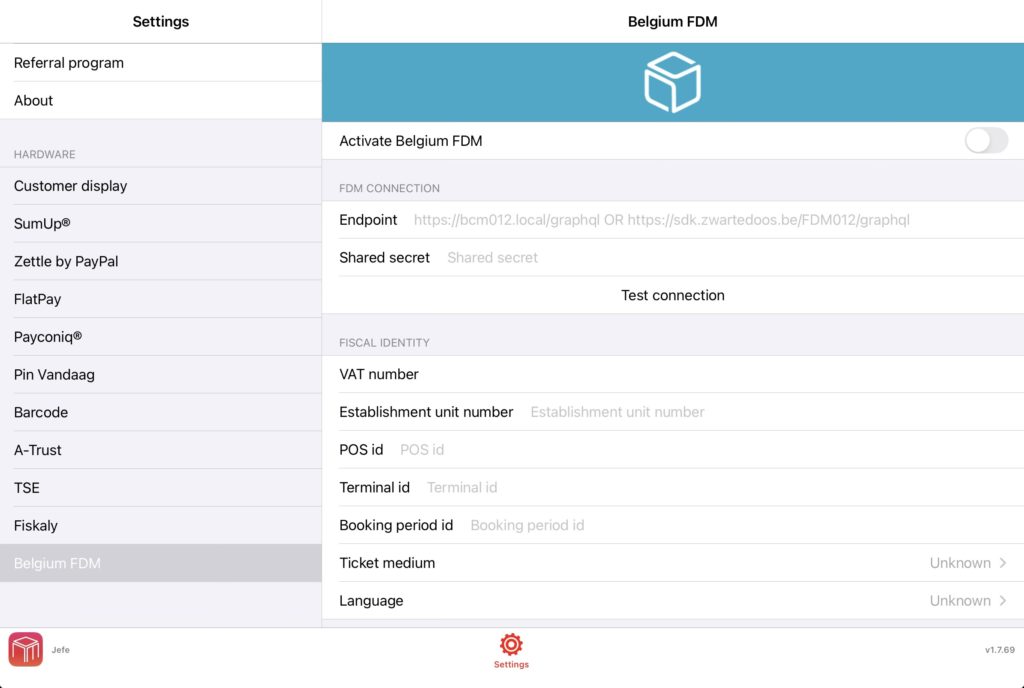
  • Belgium FDM Activation Guide

    This guide explains how to activate and configure the Belgian Fiscal Data Module (FDM) in

    the WaiterOne POS system. The FDM integration is used for staff time registration and fiscal POS

    operations.

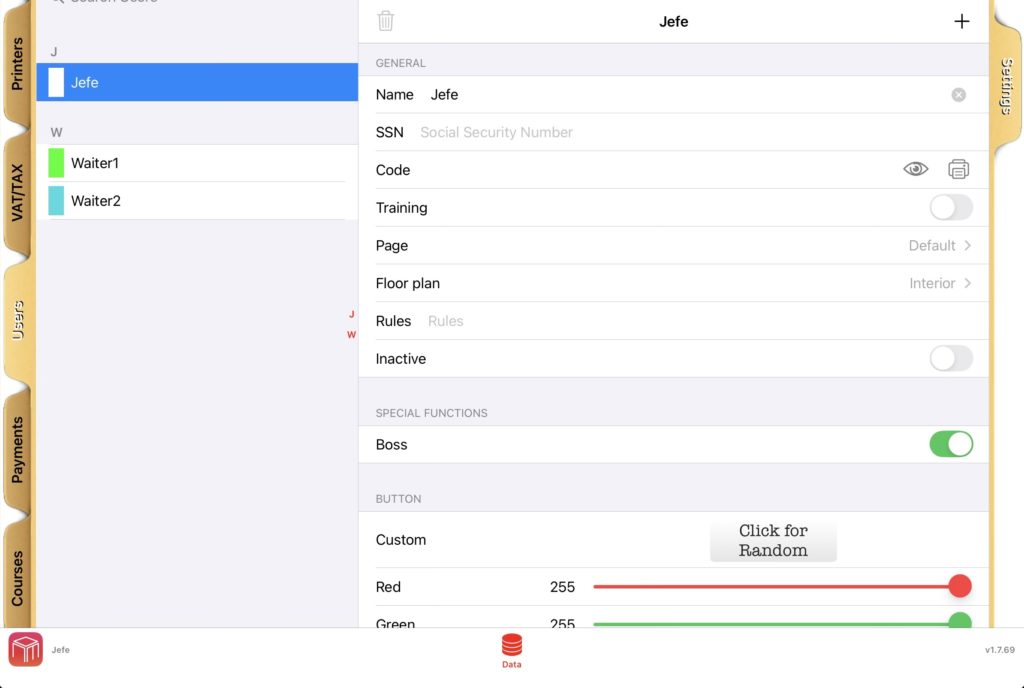
    1. Configure Staff Social Security Numbers

    Each POS operator must have their Belgian Social Security Number (SSN) configured.

    Steps:

    • Open the POS menu.
    • Navigate to: Menu → Data → Users.
    • Select each user that will operate the POS.
    • Fill in the SSN field with the employee’s official Belgian Social Security Number.

    Important: The SSN must contain 11 digits and correspond to the official number of the

    employee. This value is required for Work-In and Work-Out fiscal events.

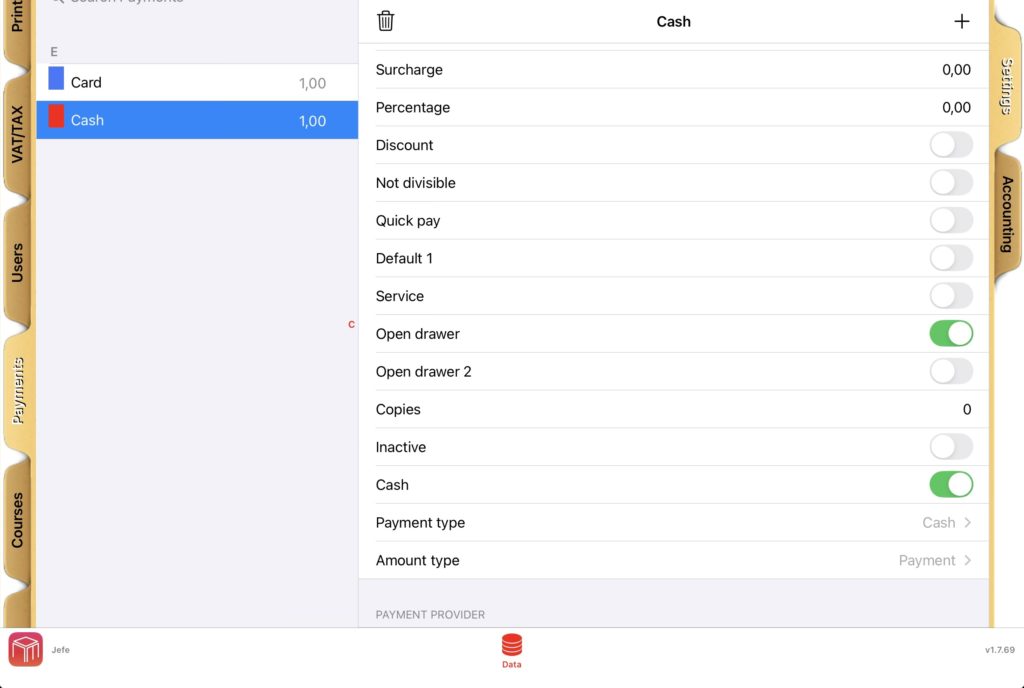
    2. Configure Payment Methods

    Each payment method used in the POS must be correctly mapped for fiscal reporting.

    Steps:

    • Open the POS menu.
    • Navigate to: Menu → Data → Payments.
    • For each payment method configured in the system, select the appropriate Payment Type and Amount Type.

    Typical configuration examples:

    Payment Method Payment Type Amount Type
    Cash CASH PAYMENT
    Card CARD PAYMENT
    Tip in cash CASH TIP
    Voucher VOUCHER PAYMENT

    Important: Every payment method used in the POS must have these fields correctly

    configured.

    3. Configure Belgium FDM Settings

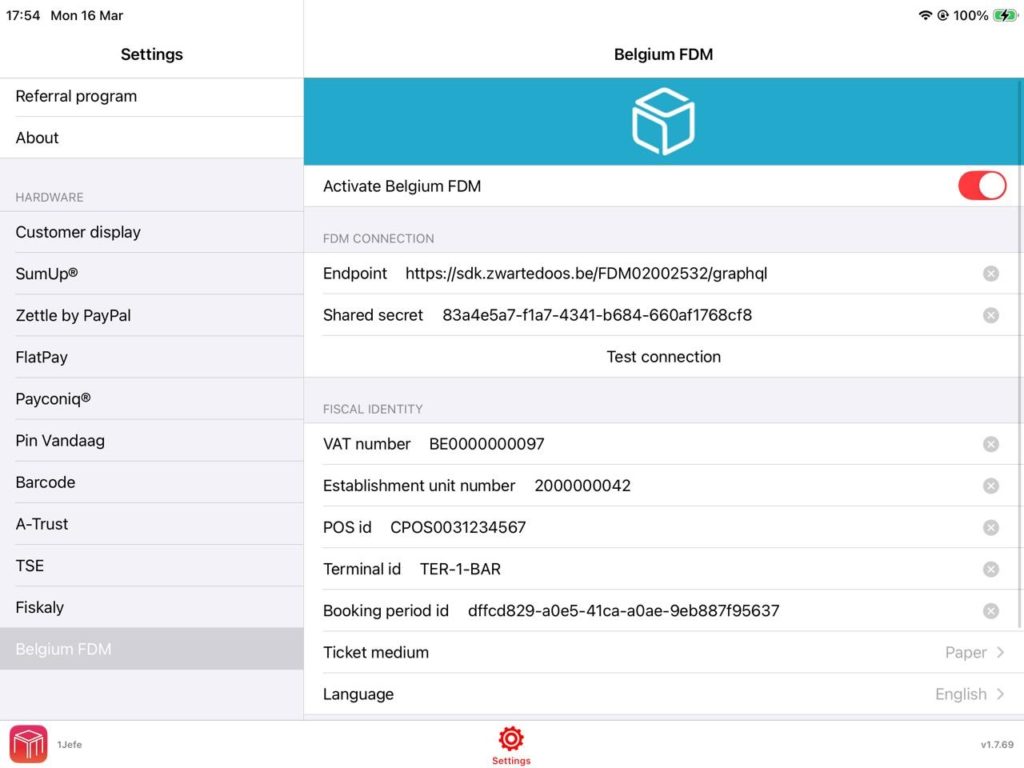
    The FDM connection parameters must be configured in the POS.

    Steps:

    • Open the POS menu.
    • Navigate to: Menu → Settings → Belgium FDM.
    • Fill in all required configuration fields.

    4. System Behaviour After Activation

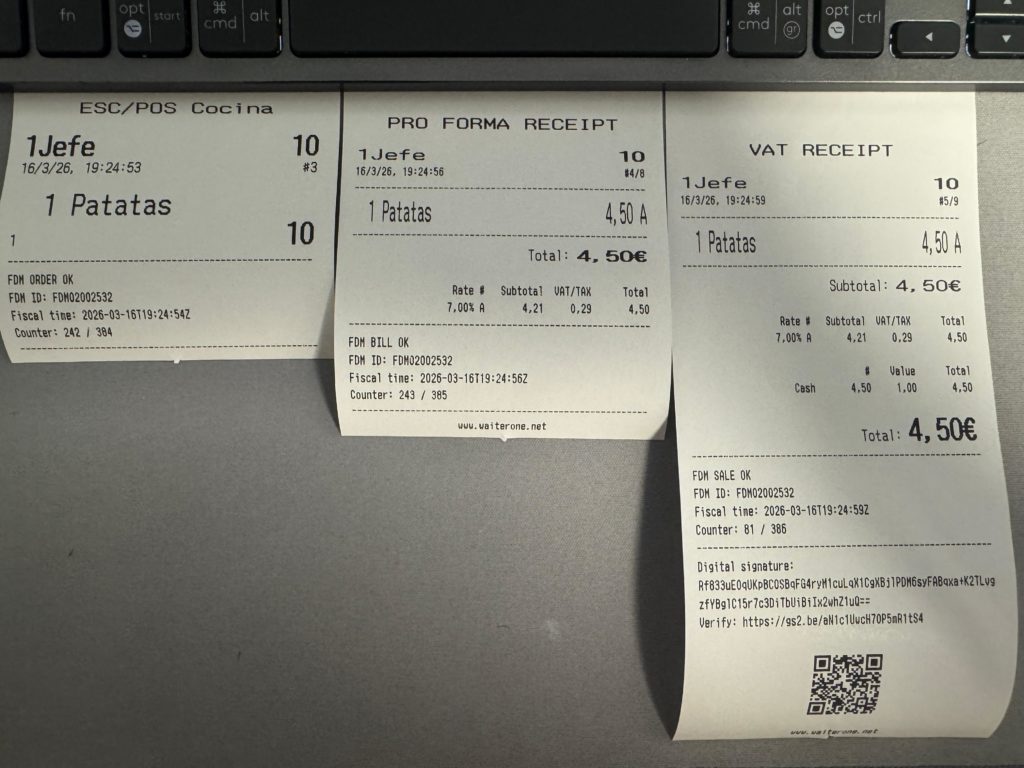
    Once all parameters are configured, the POS will automatically send fiscal events to the FDM

    system.

    • Staff Time Registration:

      Work-In events when a user starts working.
      Work-Out events when a user finishes working.
    • Fiscal POS Events:

      Orders, Bills, Payments.

    5. Important Notes

    • Each operator must have a valid SSN configured.
    • Each payment method must have a valid fiscal mapping.
    • The Belgium FDM settings must be fully configured.

    6. Troubleshooting

    • Verify that all users have a valid SSN configured.
    • Check that all payment methods have Payment Type and Amount Type defined.
    • Ensure the Belgium FDM configuration fields are correctly filled.
    • Confirm that the POS has an active internet connection.

    7. Support

    If you experience issues during activation, please contact your POS provider, technical support or WaiterOne support. When requesting support, provide the POS identifier, terminal identifier, and screenshots of the configuration.

  • How to Transfer WaiterOne to a New iPad

    Moving WaiterOne from one iPad to another is simple. Follow the steps below to transfer your database and continue working on your new device.

    1. Install WaiterOne on the new iPad

    First, download and install WaiterOne on your new iPad.

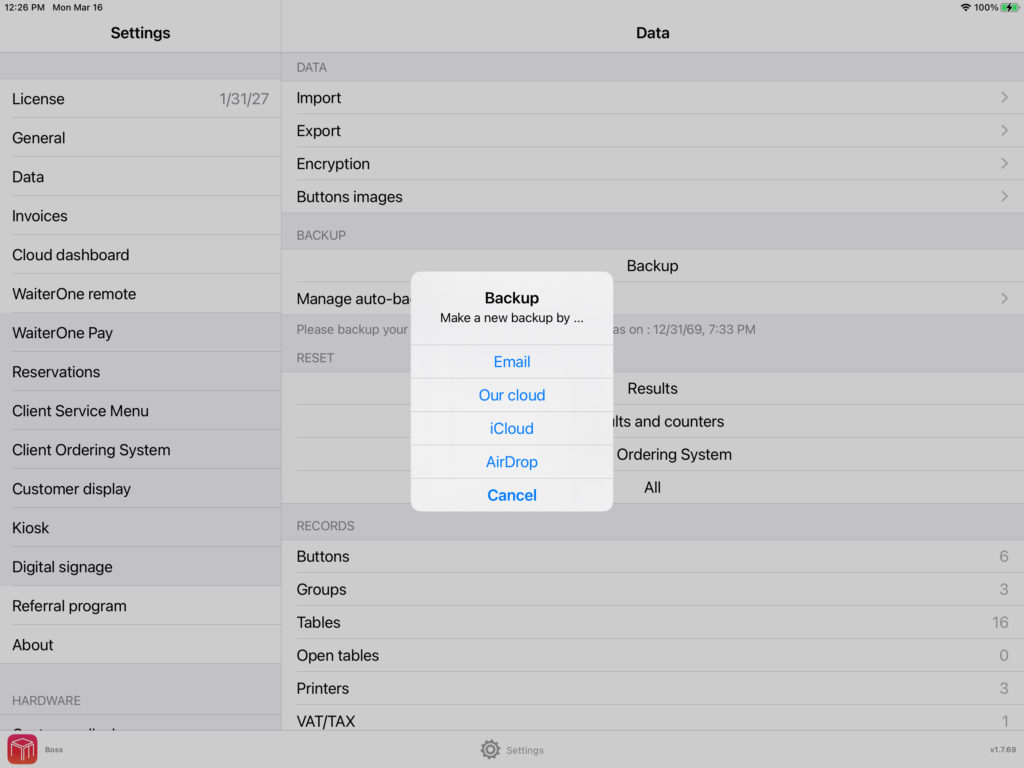
    2. Create a backup on the old iPad

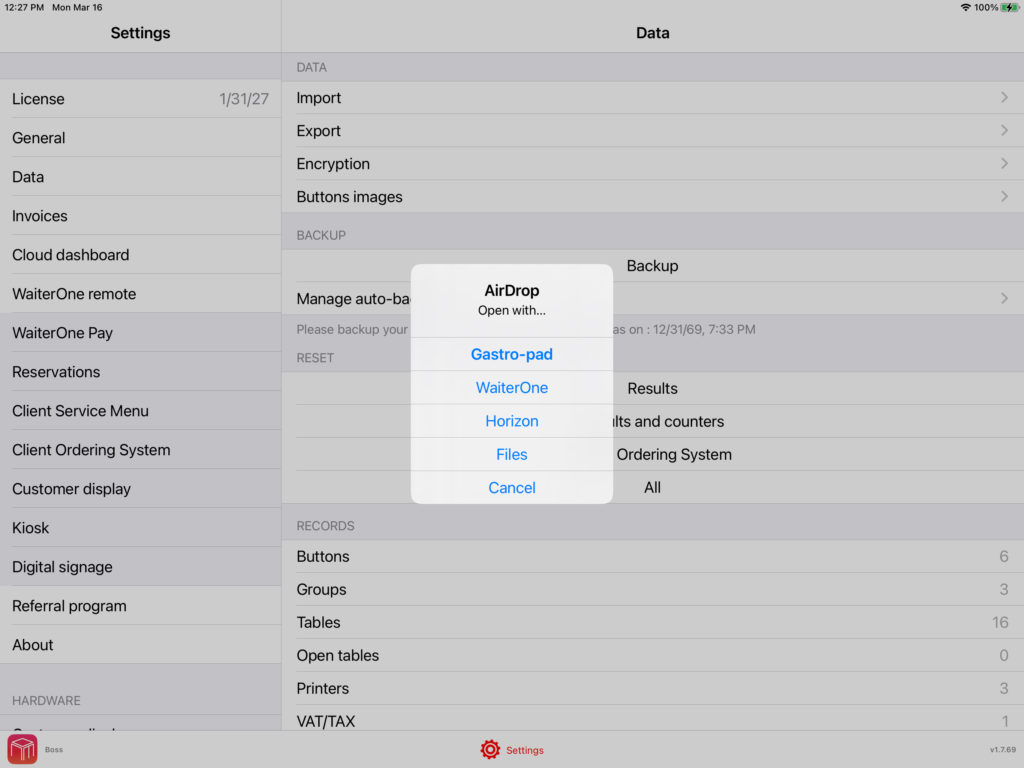
    On your old iPad, open WaiterOne and go to:

    Settings → Data → Backup

    Create a backup and choose how you want to send it:

    • Email
    • AirDrop

    Then send the backup file to your new iPad.

    3. Open the backup on the new iPad

    On the new iPad, receive the backup file and open it in WaiterOne.

    Depending on how you sent it:

    • If you used AirDrop, you can usually open it directly.
    • If you received it by email or saved it in Files, tap and hold the backup file for a moment, then choose Open in WaiterOne or Share to WaiterOne.

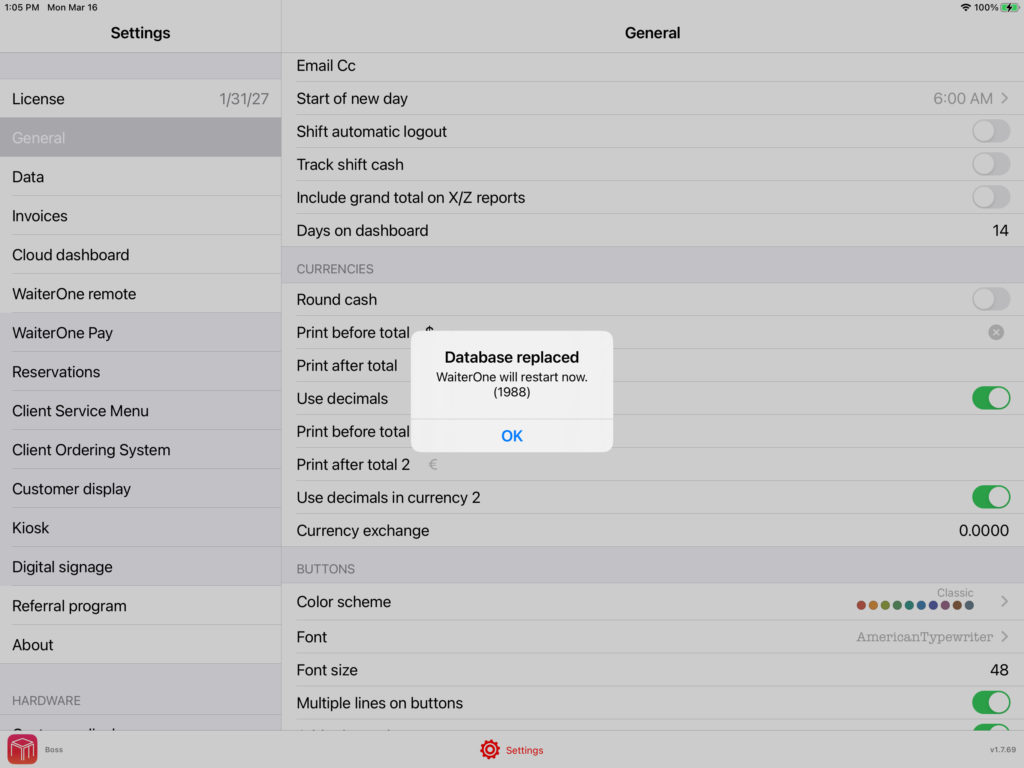
    4. Replace the database

    WaiterOne will ask if you want to replace the current database.

    Confirm this step.

    At that moment, the administrator code should be displayed.

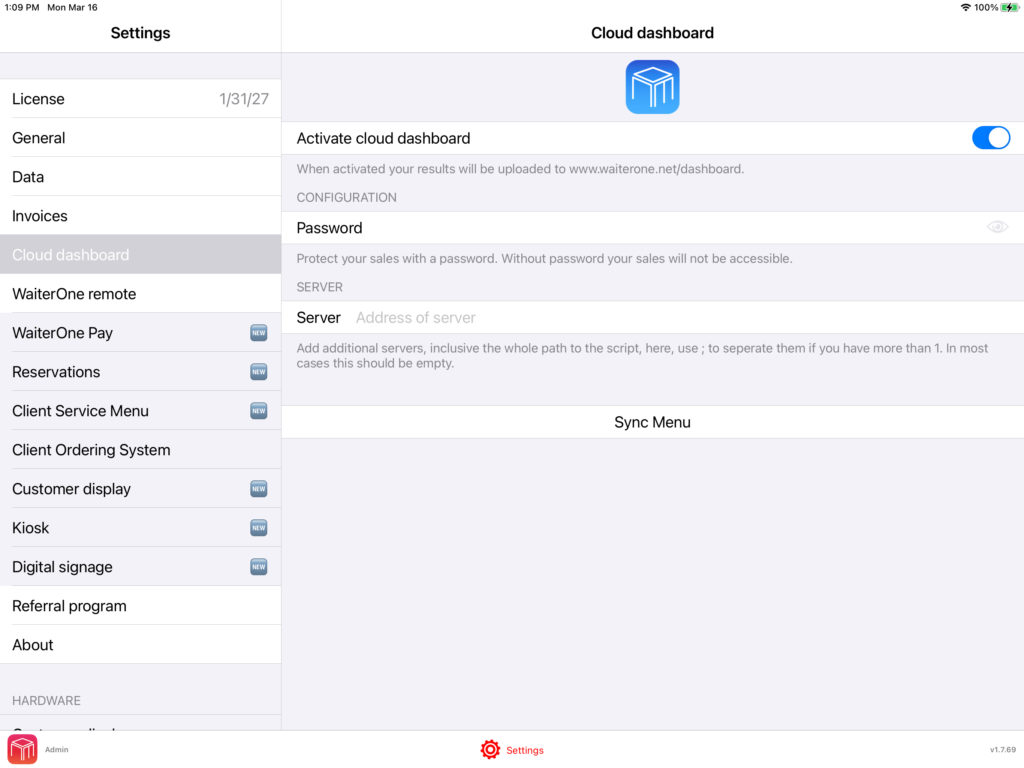
    5. Change your online dashboard password

    After the import, start WaiterOne on your new iPad and go to:

    Settings → Online Dashboard

    Please change your password there.

    This is important because the password is automatically changed after the import. We do this for security reasons, so nobody can know your password if they ever get access to your database.

    6. Contact us to transfer your license

    Once the transfer is complete, contact us so we can move your WaiterOne license to the new iPad.

    If you would also like your historical sales data to be transferred, please let us know as well, since this must be transferred separately.

  • Happy New Year from WaiterOne! 🎉

    Happy New Year from WaiterOne! 🎉

    We’re kicking off 2026 with big ambitions and an even bigger mission: to make staffing for events, festivals, and hospitality faster, simpler, and more profitable.

    At WaiterOne.app, WaiterOne.net and CashierOne.com, we’re rolling out exciting updates that will help you run your business smoother. 

    Thank you for being part of our journey.

    Follow us to stay updated and see how WaiterOne can transform the way you manage your workforce.

    Here’s to a successful, high-impact 2026! 🥂

    #HappyNewYear #WaiterOne #HospitalityTech #EventStaffing #Festivals #WorkforceManagement #SaaS #Innovation #2026

  • CashierOne is coming soon: a modern retail POS by the team behind WaiterOne

    CashierOne is coming soon: a modern retail POS by the team behind WaiterOne

    For years, we have built WaiterOne for bars and restaurants with one goal: make daily operations feel fast, reliable, and simple.

    Now we are building something new for retail: CashierOne.

    Visit CashierOne.com

    Why a dedicated retail POS

    Retail checkout is a different world. Speed matters, but so do the details: barcode scanning, product variants, returns, stock movements, and staff permissions. Many systems become complicated, slow, or expensive as soon as you need real inventory and proper control.

    CashierOne is being designed specifically for retail stores that want a modern POS experience without clutter.

    What CashierOne will focus on

    • Fast checkout: barcode scanning, variants, discounts, returns, and clean receipts.
    • Clear inventory: know what you have, what sells, and what needs reordering.
    • Roles and control: manager permissions, staff accounts, and audit-friendly logging.
    • Multi-device workflows: PC, tablet, and mobile devices depending on what fits your store.
    • International-ready: languages, taxes, and flexible settings for different markets.

    Looking for a limited number of testers

    We are selecting a limited number of testers. Testers will receive lifetime privileges and early access builds. In return, we want real feedback from real stores.

    If you are a retailer, a distributor, or you want to apply as a tester, please contact us via the inquiry form on:

    https://cashierone.com

    Follow the project

    This is the first post in a series where we will share progress and practical insights about retail POS workflows. If you want to stay close to the launch, bookmark:

    CashierOne.com

    Thank you to everyone who has supported WaiterOne since 2010. We are excited to bring the same philosophy into retail with CashierOne.

  • Optimizing Customer Facing Displays in Hospitality: Best Practices and Enhancements

    Optimizing Customer Facing Displays in Hospitality: Best Practices and Enhancements

    Example of a café POS with a customer-facing tablet display showing order details and a QR code.

    Modern restaurants, bars, and food trucks are adopting customer-facing displays to streamline service and engage guests. These screens (often tablets or embedded browser displays in fullscreen mode) show order details, payment prompts, and even idle slideshows with welcome messages. To truly optimize the customer experience, however, businesses can extend these displays with additional features and best practices. Below is a comprehensive guide to features that work well in real-world implementations, structured by category for clarity.

    Real-Time Order Status and Queue Updates

    Keeping guests informed about their order’s progress can greatly enhance transparency and reduce anxiety. Consider adding an order status tracker on the display:

    • Live Order Progress: Show real-time updates like “Order #123 – Being Prepared” and notify when it’s “Ready for Pickup.” This keeps customers in the loop from preparation to completion . Digital “order ready boards” in many quick-service restaurants display each order’s status so customers know exactly when to approach the counter . This transparency assures guests their order is on track and reduces the need to ask staff for updates .
    • Queue Position or Numbers: If applicable, display a queue number or place in line. For example, order queue screens list active orders by number or name, moving them to a “Ready” section when done. This is common in fast-casual spots and food trucks, where seeing your number advance provides peace of mind. It prevents customers from wandering or crowding the pickup area .
    • Multi-Channel Orders: If your business takes orders from multiple channels (kiosk, mobile app, third-party delivery), consolidate them on one board. Advanced systems can highlight or label orders by source (e.g. online, in-store) so every guest sees their order status regardless of how they ordered . This unified approach ensures no one is left wondering about their order.
    • Estimated Wait Times: While not always exact, giving a rough prep time or a progress bar can set expectations. Even a simple message like “~5 minutes remaining” can reassure patrons.
    • Audible Alerts: In loud environments, consider an audible cue or chime when an order is ready. In multi-language settings, some order status systems even announce ready orders in more than one language for inclusivity (e.g. speaking the order number in English and Spanish).

    By implementing real-time status updates, you minimize perceived waiting and free up staff from fielding “Is my order ready?” questions. Keeping customers informed and engaged with their order progress leads to a smoother, more interactive experience and ultimately higher satisfaction.

    Dynamic Promotions and Upselling Content

    A customer-facing display isn’t just for information – it’s prime advertising real estate at the point of sale. Leverage it to increase sales through timely promotions and upsells:

    • Promotional Banners: Showcase specials, combos, or time-of-day offers on the idle screen or a portion of the checkout screen. For instance, display a “Happy Hour 2-for-1 Drinks” banner in the late afternoon, or a breakfast sandwich deal in the morning. Customers’ eyes are naturally drawn to the screen while waiting, so an appealing deal can entice impulse buys. In fact, about 7 in 10 customers have purchased an item because a sign caught their eye, so well-placed visuals at checkout are highly influential .
    • Suggestive Upsells: Use the display to suggest add-ons related to the current order. For example, if a guest is buying a dessert, the screen might politely recommend “Try a coffee for 50% off with your cake!” This contextual upsell approach can be very effective . One case described a customer who bought a meal and, while watching the status screen, saw an offer for a half-price beverage – a smart way to increase the check size by targeting what complements their purchase . Visual prompts for upgrades (add cheese? larger size?) or cross-sells (sides, drinks, desserts) at the moment of decision can raise average spend .
    • Discount and Deal Indicators: If your system supports it, show how much the customer is saving with current promotions or how close they are to qualifying for one. For example, “Spend $2 more to get a 10% discount!” This can nudge customers to add that extra item. One retail POS example shows the screen informing customers if they’ve met a minimum purchase for a deal – encouraging them to add a small item if not .
    • Advertisements and Slideshows: During idle mode, run a slideshow of high-quality food photos, upcoming events, or loyalty program ads. Ensure ads don’t obstruct transaction details during checkout – they can rotate in a corner or alternate with the order summary. The key is to engage customers visually so their wait time feels shorter while also marketing your offerings. Bright images or even short looping videos (muted, with captions) of menu highlights can whet appetites and drive additional orders.
    • Time-of-Day Content Scheduling: Update promotions based on the time or day of week. Breakfast vs. dinner menus, seasonal specials, or limited-time offers can automatically display at relevant hours. This keeps content fresh and relevant, increasing the chance customers notice and act on it.

    By turning the screen into a mini digital signage, you not only increase potential revenue through upselling but also enhance the customer experience – guests appreciate knowing about deals and new items. Upselling at the POS is so effective that it consistently leads to larger check sizes and revenue boosts when done tastefully .

    Multi-Language Support and Localization

    Hospitality is a diverse industry, and your customers may speak different languages. A customer-facing display should accommodate this diversity to be truly user-friendly:

    • Language Selection: If the display is interactive or part of a self-service kiosk mode, allow users to choose their preferred language at the start. Many modern self-order kiosks feature a simple language menu (flags or language names) so guests can navigate in their native tongue . This immediately breaks down a barrier and makes the ordering or payment process more comfortable.
    • Bilingual Messaging: Even if the screen is mostly passive (non-interactive), consider showing key messages in a second language, based on common needs of your locale. For example, in a tourist-heavy area, an idle welcome screen might say “Welcome – Bienvenidos” or display instructions in both English and Spanish. Important prompts (like “Confirm Order” or “Enter PIN”) could be shown sequentially in two languages if space permits.
    • Localize Content and Currencies: Ensure the display can handle local conventions – e.g., switching currency symbols, date/time formats, or using appropriate color symbolism for that culture if relevant. For instance, a food truck in a bilingual city might program the system to default to the customer’s language based on a card swipe or loyalty profile, if known.
    • Multi-Language Order Announcements: In contexts where orders are announced or displayed for pickup, a multi-language capability can shine. Some order status boards will enunciate order numbers or flash “Ready” messages in multiple languages , making sure all customers understand that their food is ready. This is especially helpful in international food courts or airports.
    • Culturally Appropriate Imagery: As part of localization, use images or icons that are universally understood (or specifically tailored to the cultures you serve). Avoid language-specific text in images unless you provide translations.

    Multi-language support is crucial in diverse markets, it increases accessibility and comfort for non-native speakers . In real-world terms, a guest who might struggle to order or pay in the default language will greatly appreciate and remember that your display “spoke their language.” This inclusivity can set you apart in customer experience.

    Accessibility and Inclusive Design

    To truly delight all guests, customer-facing displays must be usable by people of all abilities. Adhering to accessibility best practices not only broadens your customer base but may also be required by regulations. Key improvements include:

    • Large, Legible Text: Use sufficiently large font sizes for item names, prices, and instructions. A good rule is to have text that seniors or low-vision customers can read at a glance. Offering adjustable text size or a zoom feature is even better . For instance, important totals or messages might be in a bold, big font so they’re easily seen across a counter.
    • High Contrast Themes: Ensure a strong contrast between text and background (e.g., dark text on a light background or vice versa). High-contrast options help those with low vision or color vision deficiencies . Avoid small light-grey text that is hard to see; instead, use clear color separation (meeting WCAG contrast ratios is a good benchmark). Some systems even provide a “high contrast” toggle for users who need it, swapping to a simplified black-and-white scheme for clarity.
    • Avoid Reliance on Color Alone: Never convey important information (like an order status or an error) by color coding alone. Pair colors with text or icons. For example, if an item is out of stock, don’t just highlight it in red also display a note or symbol. This ensures color-blind users aren’t left in the dark .
    • Screen Reader Support: If your customer-facing device has any interactive elements (e.g., a pay-at-table tablet or a self-order kiosk mode during idle times), consider screen reader compatibility. This means labeling UI elements properly so that blind or visually impaired users using text-to-speech can hear their order details or prompts . In practice, full screen reader support on a payment tablet might be challenging in a busy restaurant, but strides are being made – for instance, McDonald’s has added screen reader functionality to its self-order kiosks, along with wheelchair-friendly navigation . Such features allow blind customers to plug in headphones and have the kiosk read out the menu and options.
    • Physical Accessibility: If using tablets or kiosks, mount them at an accessible height (per ADA guidelines, typically around 48 inches max from the floor for reach). The screen should tilt or be viewable by someone in a wheelchair. Also, ensure that any touch targets (buttons on screen) are large enough and spaced out for those with limited dexterity . For touch screens, implementing larger tappable areas and avoiding reliance on fine gestures (like drag-and-drop) makes the interface more universally usable .
    • Alternative Input Methods: In some cases, providing alternative controls can be a game-changer. For example, kiosks might have a physical keypad or joystick for those who cannot use a touchscreen. While a simple customer-facing display at a counter won’t have a full control panel, it’s worth ensuring that the essential functions (like confirming a payment or entering a PIN) have an accessible mode – e.g., a customer with a tremor might prefer to have the cashier finalize the input rather than trying to hit a tiny on-screen button. Providing that flexibility as part of your training and design is important.

    By incorporating inclusive design, you not only comply with legal standards but also demonstrate respect for all guests. These improvements can make the difference between someone with a disability feeling welcome at your establishment or being unintentionally excluded. Plus, many accessibility features (like clear text and good contrast) improve usability for everyone, not just those with disabilities.

    Loyalty Program Integration

    If your business has a loyalty or rewards program, the customer-facing display is a perfect vehicle to promote and integrate it in real time. Showing loyalty information can both reward your regulars and entice newcomers to join:

    • Show Points and Rewards: Display loyalty points balance and reward status on-screen during the transaction. For example, “You have 120 points (20 points away from a free appetizer!)”. This gives instant gratification and motivation. Research shows about 50% of customers will change their behavior to reach a higher tier or reward level in a loyalty program . By showing how many points the current purchase will earn or how close the customer is to the next reward, you encourage higher spending and repeat visits .
    • Indicate Member Savings: If loyalty members get discounts or special pricing, make that visible. The screen might highlight, “Loyalty Discount Applied – You saved $5.00!”, which reinforces the value of being a member. Seeing the money they saved due to loyalty status will encourage them to keep coming back . It’s an immediate positive feedback loop: “because you’re a VIP member, your coffee is free today” is a delightful message to display.
    • Promote Sign-Ups: For non-members, use the idle or checkout screen to invite them to join. A subtle prompt like “Join our loyalty program to earn rewards on your next visit” can plant the seed. You could even generate a QR code on the screen that customers can scan with their phone to sign up quickly while they wait. Knowing that a loyalty program exists (and seeing others reap benefits) makes new customers 68% more likely to dine with you over competitors . A simple on-screen nudge can significantly boost enrollment.
    • Tier or Status Indicators: If your program has tiers (e.g., Silver, Gold, Platinum), consider showing the customer’s tier on the screen (perhaps with a small icon or color coding that aligns with your branding). It subtly signals that you recognize their loyalty level. For example, “Thank you for being a Gold Member!” on the welcome screen personalizes the experience.
    • Loyalty QR Code or Scan: Some systems allow customers to scan their loyalty card or app directly on the customer-facing display (using the device’s camera) to apply rewards. If hardware permits, this is convenient – the screen can say “Scan your app to earn points” with a live QR code scanner window. If not, simply displaying the customer’s own loyalty QR (if the POS pulls up their account) for them to scan into their phone (to check their account) can also work.

    Integrating loyalty into the display makes the program highly visible and engaging. Guests are reminded of the value they’re getting (or could get), which drives repeat business. It transforms the screen from a passive receipt viewer into an active loyalty touchpoint – a strategy proven to foster customer retention .

    Branding and Visual Consistency

    Your customer-facing display should feel like a natural extension of your brand identity and ambiance. Rather than a generic interface, customize it to enhance branding and aesthetics:

    • Brand Colors and Theme: Match the UI color scheme to your brand’s colors. If your restaurant’s theme is rustic and warm, perhaps use earth tones on the display; if it’s a modern cafe, a sleek dark or white theme might fit. Most customer display software allows customization of fonts, colors, and backgrounds – leverage this to ensure consistency with menus, logos, and décor . The goal is a seamless visual experience: the customer is looking at your brand, not just a random screen.
    • Logo and Imagery Placement: Prominently feature your logo, especially on idle screens or headers. A welcome message in idle mode could include the logo and tagline. During transactions, a small logo in a corner of the display reminds the guest of your business identity in every moment. Also use high-quality images that reflect your offerings for instance, a bakery might have a subtle background image of bread, or a bar could show a faint watermark of a cocktail. All images and animations used should reinforce the brand vibe (fun, family-friendly, upscale, etc.).
    • Smooth Transitions and Animation: Add a touch of polish with subtle animations. Instead of harsh screen flips, have content fade in/out or slide gracefully. For example, when switching from idle mode to order mode, a quick animated transition (maybe your logo briefly animates or the screen slides to the new view) can make the experience feel high-tech and professional. Be cautious to keep animations subtle and fast  they should enhance, not delay, the interface. Simple effects like a short looping animation of your mascot in the corner, or an animated progress bar, can also delight the eye without being distracting.
    • Content Management: Keep the content fresh and tailored. You might update the idle slideshow every few weeks with new dishes or seasonal promotions – this shows that your brand is active and dynamic. If you have multiple locations or use tablets, ensure each is updated with the latest branding assets (cloud-based CMS for digital displays can help push updates).
    • Environment Matching: Consider the physical environment of the screen – is it in a chic lounge, a busy food truck, or a family diner? Adjust the display’s look and feel accordingly. For a playful family restaurant, you might use friendly cartoons or vibrant colors; for an elegant bar, a minimalist design with ample negative space might be better. Also, use screen brightness and a screensaver appropriately: for example, dim the screen slightly in a low-light cocktail bar to avoid an overly harsh glow, possibly using a darker theme at night.

    With thoughtful branding on the display, you not only reinforce brand recognition but also make the technology feel integrated into the hospitality experience. Guests will remember the cohesive atmosphere – the screen becomes another touchpoint that tells your brand’s story (and not just a utilitarian device). As TouchBistro notes, these displays are essentially a form of digital signage and should be treated as valuable real estate for your brand message .

    Interactive Features and Feedback Opportunities

    Many customer-facing screens today have touch capabilities, opening the door for direct guest interaction. Even simple interactivity can significantly improve engagement and provide value. Here are some interactive features to consider:

    • Easy Tip Selection: Tipping is a critical part of the payment flow in many regions. Use the customer display to present suggested tip amounts (e.g., buttons for 15%, 20%, 25% or “No Tip”) in a clear, friendly way. This not only simplifies the process for customers but can also boost tips for your staff . For instance, upon payment, the screen can say “Would you like to leave a tip?” with large preset buttons – this has been shown to increase tip frequency and size because it gently prompts the guest and makes adding a tip as easy as a tap . Ensure the interface is polite and allows opting out (e.g., an easy “No Tip” or custom tip option) to avoid pressuring the customer.
    • Digital Signature or Consent: If needed (for receipts or cards), the touch screen can let customers sign digitally. This is standard for many tablet POS systems – the signature is captured on the customer-facing tablet, streamlining the checkout. Just make sure the signature box is large enough and responsive.
    • On-the-Spot Feedback: Implement a quick feedback prompt at the end of a transaction. This could be as simple as a thumbs-up or thumbs-down, a 5-star rating, or a short emoji-based survey (“How was your experience today? 🙂 😐 🙁”). Because the customer is still present and the experience fresh in their mind, you may get more accurate feedback. Keep it optional and brief – one tap – so it doesn’t hold up the line. Over time, these micro-surveys can alert you to issues or successes. For example, a pattern of low scores at certain times might indicate a service issue that needs addressing.
    • Email/Text Receipt Entry: Allow customers to input their email or phone for a digital receipt or to join a mailing list right on the customer display (if the screen is accessible). Many POS systems do this: after payment, the screen asks if the customer wants the receipt emailed, and if so, they can type their address. Ensure the on-screen keyboard is large and that an alternative (like printing or skipping) is readily available for those who don’t want to use it. This feature not only is convenient but can help build your customer contact list (with consent).
    • Loyalty Sign-In or Enrollment: Tying back to loyalty integration – if the screen allows, let existing loyalty members check in (e.g., by entering a phone number or scanning a QR code on their app). Or let new users quickly enroll by entering minimal info. For touch displays, a virtual keyboard or numeric pad can facilitate this. The key is to make it quick: perhaps just a phone number to link to their new account. Any longer process should be kicked to a URL/QR code for the customer to complete later on their own device to avoid bogging down the checkout.
    • Post-Transaction Engagement: After the sale, you might use the screen to ask if the customer wants to do something interactive. For instance, “Tap to play our weekly giveaway” or “Vote for our next special flavor!”. These are more experimental, but some businesses use their tablet screens for simple games or polls once the payment is done (especially if the device will otherwise just revert to idle mode while the customer is still present). One caution: only do this if you’re not busy, as you don’t want to cause a queue – it’s more suitable for kiosks or slower periods. But a quick “spin the wheel” for a chance at a discount on a future visit could be a fun touch that leaves a lasting positive impression.
    • Safety and Privacy Considerations: Any interactive element must respect privacy. For example, if collecting emails or feedback, assure customers their info is safe (a short privacy note or icon is a good idea). Also, have a timeout – if the customer walks away, the screen should clear any personal data after a short while.

    When thoughtfully implemented, interactive features can make the customer feel truly part of the process rather than a passive participant. Even something as simple as selecting their own tip or giving a quick rating gives a sense of control and engagement. In practice, businesses have found that a user-friendly display with interactivity leads to higher tips, more sign-ups, and actionable feedback, all while keeping the experience fun and efficient .

    Minimizing Perceived Wait Time and Entertaining Guests

    One of the subtle but powerful benefits of a well-designed customer-facing display is its ability to reduce the psychological weight of waiting. By providing something interesting to look at or do, the display can make time seem to pass more quickly for waiting guests. Here’s how to leverage it to delight and distract:

    • Engaging Idle Content: Don’t let the idle mode just show a blank screen or simple logo – use it to display content that entertains. This could be a slideshow of beautiful food photography, behind-the-scenes glimpses of your kitchen or team, or fun facts about your cuisine (e.g., “Did you know our pizza dough ferments for 48 hours?”). Some restaurants incorporate trivia questions or quirky facts on their waiting screens. For example, a BBQ joint might show “BBQ Fact: The longest cookout lasted 48 hours!” to amuse guests. Occupied minds are less likely to dwell on the wait, and research confirms customers perceive waits as shorter when they have something to engage with .
    • Message of the Day & Social Feeds: Update the display with a “message of the day” or daily special, paired with an eye-catching graphic . It could be a welcome note (“Happy Friday! Thanks for joining us.”) or a note from the chef about a new dish. Additionally, consider showing your latest Instagram posts or a feed of positive customer testimonials/tweets (with moderation). Highlighting your social media can entertain guests and even prompt them to follow you – it’s a captive audience at the counter . Seeing a stream of appetizing Instagram photos or a TikTok of a new menu item can keep customers busy and excited.
    • Visual Order Progress: We mentioned real-time statuses earlier; here we note that a visual progress bar or animation while preparing an order can also reassure customers. Even if not 100% literal, a small animation (like a coffee cup filling up, or a burger assembling in stages) provides a sense of progress and distracts from the clock. It’s the same idea as the loading animations on apps – psychologically, it’s better than staring at nothing.
    • Light Entertainment: Depending on your venue, you might play short silent videos (with captions) – for example, a smoothie bar could show a quick video of fruits being blended with fun facts popping up. Or a sports bar might display the current game scores/ticker on part of the screen during idle mode. Another idea is a local community board – upcoming events or partnerships, which can be interesting for guests to read. The content should be positive and on-brand; avoid anything that could be controversial or overly distracting (you still want them to focus when needed).
    • Customer Spotlights: A creative idea some establishments use: display user-generated content or thank-you messages. E.g., “Thanks for visiting, John! Enjoy your meal.” if the system knows the customer’s name from loyalty, it can personalize a brief message. Or show a mosaic of customer selfies (with permission) enjoying their food. People love seeing themselves or relatable others on screen – it creates a connection and makes the wait feel more social and fun.
    • Gamified Waiting: In scenarios with longer waits (like a busy brunch spot where lines form), a touch-enabled kiosk might include a simple game (think along the lines of a scratch-off card on the screen to win a discount, or a quick puzzle). If your hardware and queue allow it, this can be a memorable touch that turns waiting into a mini-activity. For example, “While you wait, play our Coffee Quiz – win a free topping!”. Keep games extremely short and easy to avoid frustration and ensure they can be abandoned once the service proceeds.

    The overarching principle is to distract from boredom and reward the customer’s attention. By the time their order is ready or payment is done, they feel the wait was shorter than it actually was . This not only improves immediate satisfaction but also increases the likelihood they’ll return (since waiting wasn’t painful). A well-engaged customer is often a happier, more patient customer. And as one study noted, even a small reduction in perceived wait time can have a meaningful impact on a restaurant’s bottom line due to improved customer retention .

    Hardware and Implementation Considerations

    All these features should be implemented with an eye on the practical hardware used in hospitality settings – whether it’s an iPad at the counter, an Android tablet, or a purpose-built browser display. Here are some tips to ensure your setup supports the enhanced experience smoothly:

    • Device Compatibility: Modern POS systems like Square, Toast, and TouchBistro often use off-the-shelf tablets for customer-facing displays . Ensure your software runs reliably on the chosen platform (iOS, Android, or Windows). For web-based displays, use a fullscreen browser kiosk mode. Test the interface on various screen sizes (e.g., a 10″ iPad versus a 15″ Android tablet) and orientations (portrait vs. landscape) to confirm everything remains readable and well-scaled. Responsive design is key if using a web app.
    • Kiosk Mode and Reliability: Configure tablets in a kiosk mode (Guided Access on iPad, or pinning an app on Android) so that customers cannot exit the app or see system pop-ups. Disable any notifications or distractions on that device. The device should boot directly into the display app and ideally auto-recover if it crashes. Nothing kills the vibe like a Windows error dialog or a home screen appearing on what should be a dedicated customer display.
    • Network and Offline Handling: If your display content is cloud-powered or needs network (for pulling down promotions or being in sync with order status), plan for intermittent connectivity. Cache key information (like the last menu, or a default idle slideshow) so that even if Wi-Fi blips, the screen can continue to show useful content (rather than a blank screen or loading icon). If using devices like iPads, ensure a strong and stable Wi-Fi signal at the counter and consider using enterprise profiles to keep them connected to the right network.
    • Power and Placement: These devices need to remain powered through long shifts. Use secure wiring or charging docks so that the screen doesn’t die mid-service. For example, many setups have the tablet physically mounted on a stand that also charges it. Hide cables for both aesthetics and safety. Additionally, position the screen for optimal customer visibility – angled toward the customer at a comfortable viewing angle. Glare can be an issue outdoors or near windows, so consider anti-glare screen protectors or shade for food truck deployments. High-brightness screens might be necessary in sunlight.
    • Durability: In a restaurant environment, spills and knocks happen. Use cases or mounts that protect the hardware. If using consumer tablets (like an iPad), invest in a sturdy enclosure (often metal or heavy-duty plastic) that is tamper-proof and possibly lockable (to prevent theft of the tablet). For example, many iPad-based POS systems come with locking stands. Also consider a waterproof or water-resistant case if the device might be exposed to rain (food trucks) or liquids at a bar.
    • Maintenance: Develop a routine to keep the displays running smoothly. This includes cleaning the screen regularly (smudges and grease can make it hard to read), rebooting devices during off-hours to prevent memory bloat, and applying software updates in a timely manner. Have spare devices or a backup plan in case a unit fails – you don’t want to lose the customer-facing functionality during a rush.
    • Performance Optimization: Fancy animations and high-resolution slideshows are great, but ensure the device can handle them. Test the CPU/Memory usage of your content on the actual hardware. If you notice lag, simplify the visuals or transitions. The experience should be snappy – customers will only be glancing at the screen for short periods in many cases, so any delay in updating info (like an item appearing after it’s rung in) could cause confusion. Aim for real-time mirroring of the POS input with minimal latency.
    • Security: Since these displays might show sensitive info (like prices, or even a QR code for payment), make sure the data is secure. The device should be locked down so that customers cannot, for example, swipe down to notification center or other apps. Also, if the display shows any personal info (like names for order pickup or loyalty info), ensure you’re following privacy best practices – first name and last initial is safer than full name to display in public, for instance. Regularly check that your customer-facing content doesn’t accidentally expose something it shouldn’t.

    Considering these hardware factors is important to translate great features into a great experience. A beautifully designed display feature that lags or a tablet that keeps rebooting will frustrate both customers and staff. Real-world successful implementations, such as the Square Register’s customer display, were built with dedicated hardware and software working in harmony . Even if you’re using consumer tablets, treating them like professional appliances – with proper mounting, maintenance, and software care – will ensure your customer-facing display truly enhances the guest experience day in and day out.

    Conclusion

    Customer-facing displays in restaurants and hospitality venues have evolved from simple order viewers to multifaceted customer experience hubs. By implementing real-time order status updates, dynamic promotions, multi-language support, accessibility features, loyalty integration, strong branding, interactivity, and engaging content, you transform a basic screen into a powerful tool for guest satisfaction and sales growth. These best practices are drawn from what real-world operators have found effective – from fast-food chains using order-ready boards to small cafes leveraging iPad displays for loyalty and upselling. The overarching theme is to keep the customer informed, engaged, and entertained at every stage: idle, ordering, and payment.

    When done right, a customer-facing display can reduce errors, build trust through transparency, encourage extra purchases, and make waiting enjoyable all of which contribute to a better overall impression of your business . In a competitive hospitality landscape, such details in customer experience can set you apart. As you implement these enhancements, gather feedback from both customers and staff; continually refine the content and features to best suit your unique environment and audience.

    Ultimately, the goal is a win-win scenario: guests feel looked after and engaged, and you benefit from smoother operations and increased loyalty. A thoughtfully optimized display is more than just a screen – it becomes an integral part of your service that delights customers and keeps them coming back for more.

    Sources:

    • Priority Commerce – Benefits of Customer Facing POS Displays
    • Pej (2023) – Order Ready Boards to Keep Customers in the Loop
    • TouchBistro – POS Customer Displays for Upselling and Loyalty
    • TPGi (2023) – Accessible Kiosk Design Guidelines
    • NRS Plus – Customer Screen Promotions and Loyalty Savings
    • Square (2022) – Customer Display Overview
    • Cervion Systems – Tips and Promotions on Customer Displays
  • Expanding Access: WaiterOne Now Free with SumUp in 34 Countries

    At WaiterOne, we’re constantly looking for innovative ways to empower independent hospitality businesses. Today, I’m excited to announce a game-changing initiative that will make our powerful POS platform more accessible than ever before in 34 countries across Europe, Latin America, and Australia.

    WaiterOne Now Free with SumUp Integration

    We believe that every hospitality business deserves access to enterprise-level technology, regardless of size or location. That’s why we’re thrilled to announce that WaiterOne is now available completely free when integrated with SumUp payment processing in selected markets where we’re expanding our presence.

    This initiative allows hospitality businesses in these regions to access our complete platform—including inventory management, staff scheduling, reporting, and our recently enhanced Kitchen Display System—without any monthly subscription fees when they process at least €5,000 per month through SumUp.

    How It Works

    Getting started with free WaiterOne access is simple:

    1. Order a SumUp terminal directly from www.sumup.com
    2. Activate the terminal inside the WaiterOne app with a few taps
    3. Process at least €6,000 per month using your SumUp terminal
    4. Automatically receive one free month of WaiterOne for every month you meet the minimum

    There’s no complicated rebate process or hidden fees—the system automatically tracks your payment volume and applies the free license when you reach the threshold.

    Why We’re Making This Move

    This strategic partnership with SumUp reflects our commitment to three core principles:

    1. Success-Based Business Models

    We’ve always believed that our success should be tied directly to our clients’ success. By offering WaiterOne free with SumUp payments, we’re taking this philosophy to its logical conclusion—we only benefit when our clients are processing significant transaction volumes.

    This aligns perfectly with our broader vision of success-based pricing that scales with our clients’ businesses rather than imposing fixed costs regardless of business performance.

    2. Market Expansion Through Strategic Partnerships

    The hospitality industry is increasingly moving toward integrated solutions that eliminate the complexity of managing multiple disconnected systems. By partnering with SumUp, we’re creating a seamless experience that combines powerful POS capabilities with reliable payment processing.

    This partnership model represents the future of hospitality technology—consolidated platforms that provide end-to-end solutions rather than fragmented point products.

    3. Removing Barriers to Digital Transformation

    In many of the markets where we’re launching this initiative, independent hospitality businesses face significant barriers to adopting modern technology. By eliminating the upfront subscription cost, we’re making it possible for these businesses to access the same powerful tools used by larger chains.

    This democratization of technology is central to our mission of empowering independent businesses to compete effectively in an increasingly challenging market.

    Countries Where WaiterOne Is Now Free with SumUp

    This initiative is available in the following 34 countries:

    Country Minimum Sales
    Austria 6000 €
    Bulgaria 6000 €
    Canary Islands 6000 €
    Croatia 6000 €
    Cyprus 6000 €
    Czech Republic 148 874 Kč
    Denmark 44 751 kr
    Estonia 6000 €
    Finland 6000 €
    France 6000 €
    Greece 6000 €
    Hungary 2 420 350 Ft
    Ireland 6000 €
    Italy 6000 €
    Latvia 6000 €
    Lithuania 6000 €
    Luxembourg 6000 €
    Malta 6000 €
    Norway 69 220 kr
    Poland 25 665 zł
    Portugal 6000 €
    Romania 30 314 lei
    Slovakia 6000 €
    Slovenia 6000 €
    Spain 6000 €
    Sweden 65 613 kr
    United Kingdom 5052 £
    Brazil 38 658 R$
    Chile 6 416 336 CLP$
    Colombia 28 172 642 COP$
    Mexico 131 655 MX$
    Peru 24 776 S/
    United States 6854 $
    Australia 10 550 A$

    These markets represent exciting growth opportunities for WaiterOne, and we’re committed to building strong local communities of users in each region.

    The Power of Integrated Financial Platforms

    This partnership with SumUp builds on the trends we discussed in our recent post about integrated financial platforms. By combining POS functionality with payment processing, we’re creating a seamless financial operating system that provides a single source of truth for all business operations.

    The benefits of this integration include:

    • Simplified reconciliation: Payments automatically match with orders
    • Reduced administrative overhead: No need to manually compare POS reports with payment processor statements
    • Enhanced reporting: Comprehensive financial insights in one place
    • Streamlined operations: Staff only need to learn one system

    For businesses in these 23 countries, this integration now comes with the added benefit of eliminating monthly subscription fees entirely when meeting the minimum processing volume.

    What This Means for Existing Clients

    For our existing clients in other markets, we remain committed to our current pricing model, which has proven successful in creating sustainable partnerships. This new initiative is specifically designed for markets where we’re looking to build our presence.

    However, the SumUp integration is available to all clients who wish to take advantage of the streamlined payment processing capabilities, regardless of location.

    Looking Ahead: The Future of Hospitality Technology

    This partnership with SumUp represents just one aspect of our broader vision for the future of hospitality technology. We continue to believe that the most successful platforms will be those that:

    1. Align costs with client success
    2. Integrate all aspects of operations
    3. Provide enterprise capabilities through intuitive interfaces
    4. Scale seamlessly from single locations to complex multi-site operations

    As the industry continues to evolve, we remain committed to leading this transformation and ensuring that independent hospitality businesses have access to the tools they need to thrive.

    Getting Started

    If you operate a hospitality business in one of the 34 countries listed above, you can start taking advantage of this offer immediately. Simply download the WaiterOne app, sign up for an account, and follow the in-app instructions to order and activate your SumUp terminal.

    For businesses in other regions interested in learning more about our standard pricing or the benefits of SumUp integration, please contact our team for more information.


    WaiterOne serves 2000+ hospitality businesses with an integrated POS platform that includes inventory management, staff management, reporting, and our recently enhanced Kitchen Display System. To learn more about how we’re helping independent businesses compete with enterprise-level capabilities, visit www.waiterone.net.


    About the Author:
    Eddy Van Hoeserlande is the Founder and Strategic Commander-in-Chief of WaiterOne. With extensive experience in hospitality technology, Eddy is passionate about creating solutions that level the playing field for independent businesses.