Tag: Fiskaly TSE POS

  • No Internet? No Problem. WaiterOne Keeps Your Business Running

    No Internet? No Problem. WaiterOne Keeps Your Business Running

    When technology fails, your business shouldn’t have to. At the end of April 2025, parts of Spain experienced a widespread electricity and internet outage, leaving many restaurants and cafés scrambling to keep operations going. But for WaiterOne POS users, it was business as usual.

    Local System, Global Advantage

    Unlike cloud-based systems that depend on constant internet connectivity, WaiterOne runs locally on your Mac or PC. This means that even when the internet goes down, your POS continues to function flawlessly. Orders, payments, and receipts can all be handled without disruption.

    In a world where digital reliability is increasingly important, local-first architecture is a game-changer.

    Power Out? Your iPad Keeps Working

    During the April outage, several clients in Spain reported that their WaiterOne systems kept running smoothly. Even when electricity was cut, they continued to take orders using their iPads, which remained powered thanks to built-in batteries. This allowed them to:

    • Keep serving customers without delays
    • Print orders locally to kitchen and bar printers (still active on backup power or battery packs)
    • Avoid losing sales or frustrating guests
    • Stay operational while competitors relying on cloud POS systems were down

    No Downtime, No Lost Revenue

    WaiterOne is built with practical resilience in mind. By working over a local Wi-Fi network, it ensures that service continues even in adverse conditions. Whether it’s an internet outage, a router glitch, or a temporary power loss, your restaurant doesn’t stop and neither does your revenue.

    Why It Matters

    For restaurants, cafés, food trucks, and bars, every minute of downtime is a lost opportunity. With WaiterOne:

    • You’re not dependent on a server in the cloud
    • You’re in full control of your operations
    • You can keep taking orders, print tickets, and serve customers even when the lights go out

    Real Proof from Real Businesses

    The recent events in Spain are a clear example: while others paused, WaiterOne clients kept working. That’s the reliability every hospitality business needs in unpredictable times.


    Ready to Run Without the Internet?

  • So aktivieren Sie Fiskaly in Ihrer POS-Anwendung und welche Kosten entstehen

    This post is in German, as it is only for the German audience.

    In diesem Blog zeigen wir Ihnen die Schritte, die erforderlich sind, um Fiskaly in unserer POS-Anwendung zu aktivieren. Außerdem erklären wir die mit diesem Service verbundenen Kosten, sowohl die von Fiskaly als auch die von uns verwalteten.

    Was ist Fiskaly und warum ist es verpflichtend?

    In Deutschland verlangen die steuerlichen Vorschriften, dass alle Kassensysteme den Kassensicherungsverordnung (KassenSichV) einhalten, die die Implementierung einer technischen Sicherheitseinrichtung (TSE) vorschreibt. Fiskaly bietet eine cloudbasierte TSE-Lösung an, die einfach zu integrieren ist und keine zusätzliche Hardware erfordert. Dadurch wird sichergestellt, dass Transaktionen über das Kassensystem den deutschen Steuervorschriften entsprechen.

    Schritte zur Aktivierung von Fiskaly in Ihrem POS-System

    1. Vertrag mit uns: Bevor Sie die Fiskaly-Funktion aktivieren können, müssen Sie einen Vertrag mit unserem Unternehmen unterzeichnen. Dieser Vertrag legt die Servicebedingungen fest, einschließlich der anfänglichen Einrichtungsgebühren und der jährlichen Gebühr.
    2. Erstkonfiguration: Nach Vertragsunterzeichnung richtet unser Team Fiskaly in Ihrem POS-System ein. Dies umfasst:
      • Registrierung bei Fiskaly.
      • Konfiguration von Schlüsseln und Anmeldeinformationen.
      • Validierung der Integration.
    3. Aktivierung in der Anwendung: Nach der Erstkonfiguration können Sie Fiskaly direkt über die Einstellungen in Ihrer POS-Anwendung aktivieren. Folgen Sie einfach diesen Schritten:
    1. Gehen Sie zum Einstellungsbereich der Anwendung.
    2. Wählen Sie die Option “Fiskaly aktivieren”.
    3. Bestätigen Sie die Aktivierung.
    4. Funktionsprüfung: Nach der Aktivierung führen Sie einen Test durch, um sicherzustellen, dass Transaktionen korrekt im TSE-Schema erfasst werden.

    Beispiel für einen Beleg mit Fiskaly-Daten:

    Beleg mit Fiskaly-Daten

    Beispiel für einen Beleg mit Fiskaly-Daten im QR-Format:

    Beleg mit Fiskaly-Daten im QR-Format

    Beispiel für einen Beleg mit Fehlermeldung, wenn Fiskaly ausfällt:

    Anfallende Kosten

    Die Aktivierung von Fiskaly in Ihrem POS-System verursacht folgende Kosten:

    1. Jahresgebühr von Fiskaly

    Fiskaly erhebt für seinen cloudbasierten TSE-Dienst eine jährliche Gebühr. Diese Gebühr variiert je nach Anzahl der registrierten Geräte und durchgeführten Transaktionen und ob Sie die DSFinV-K-Berichte und -Exporte von Fiskaly nutzen möchten. Für die meisten Kunden beträgt die monatliche Gebühr 10 € bzw. 15 € (mit dem optionalen DSFinV-K-Modul) pro Installation.

    2. Einrichtungsgebühr (Unser Service)

    Von unserer Seite wird eine Pauschalgebühr für die Ersteinrichtung des Systems erhoben. Diese Kosten beinhalten:

    • Individuelle Konfiguration von Fiskaly in Ihrem POS.
    • Tests und Validierung der Integration.
    • Unterstützung während des Aktivierungsprozesses.

    Die Einrichtungsgebühr beträgt 50 €.

    Vorteile der Nutzung von Fiskaly

    • Garantierte gesetzliche Konformität: Fiskaly ist zertifiziert, um die Vorschriften der KassenSichV zu erfüllen.
    • Cloudbasierte Lösung: Es ist keine zusätzliche Hardware erforderlich.
    • Einfache Integration: Unsere POS-Anwendung vereinfacht den Aktivierungs- und Verwaltungsprozess von Fiskaly.
    • Skalierbarkeit: Ideal für Unternehmen mit mehreren Geräten und Standorten.

    Fazit

    Die Aktivierung von Fiskaly in Ihrem POS-System ist ein wesentlicher Schritt, um den deutschen Steuervorschriften zu entsprechen. Unser Team steht Ihnen zur Verfügung, um den Prozess von der Vertragsunterzeichnung bis zur Einrichtung und Aktivierung zu vereinfachen. Wenn Sie Fragen zu den Kosten oder dem Prozess haben, kontaktieren Sie uns gerne.

    Stellen Sie sicher, dass Ihr Unternehmen heute gesetzeskonform ist!

  • Understanding Tax Levels in WaiterOne

    WaiterOne offers a flexible and intuitive way to manage taxes, making it easier for businesses to handle varying tax rates depending on the type of sale. A frequent question we receive is how to set up different tax levels for dine-in versus takeaway orders. Let’s break it down step by step.

    Three Tax Levels Per Group/Table

    In WaiterOne, you have the ability to assign up to three tax levels per group or table. This allows you to create different tax settings based on the nature of the sale. For example, you might have one tax rate for dine-in customers and a different one for takeaway orders. Here’s how you can set it up:

    Step 1: Configure a Table for Takeaway

    To differentiate tax rates for takeaway orders, start by creating a table specifically for takeaway sales. Once this table is set up:

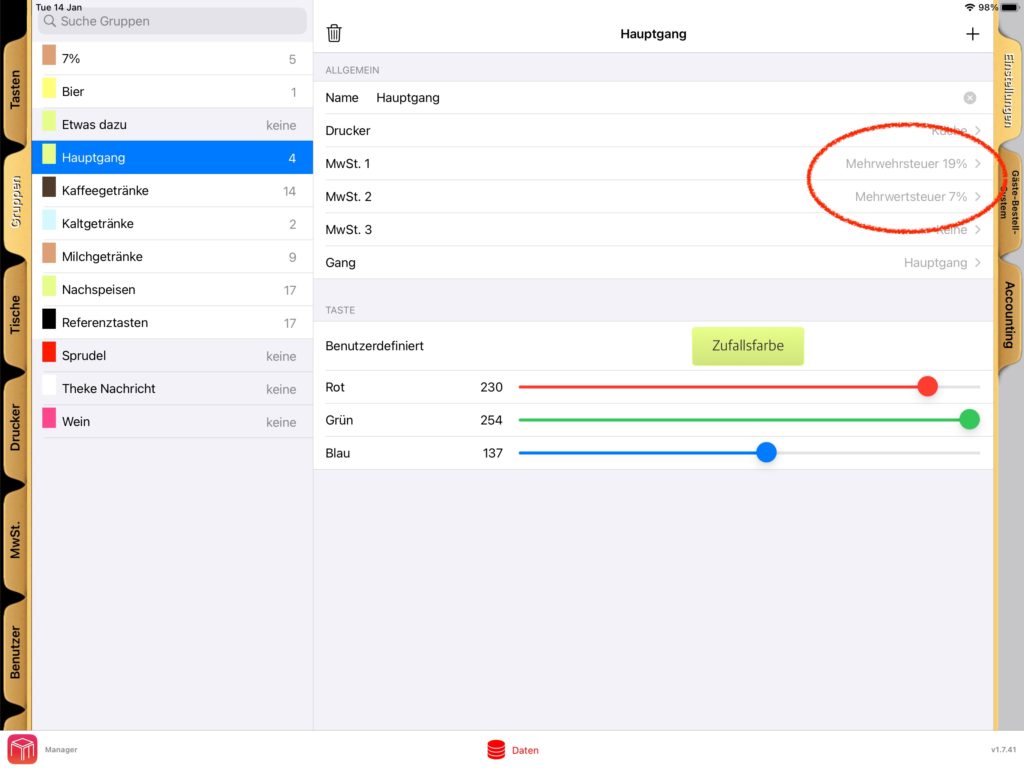
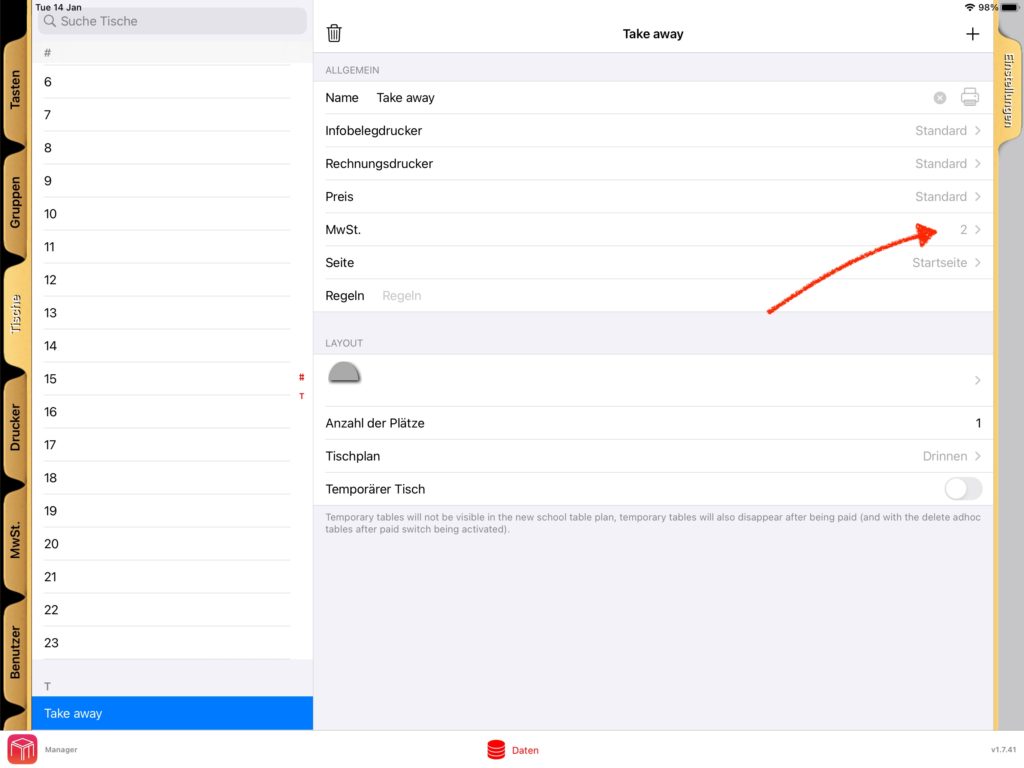
    1. Assign Tax Level 2 as the tax level for this takeaway table.
    2. When you process a sale using this table, the system will automatically apply the tax rate assigned to Tax Level 2.

    This setup ensures that any sales recorded under the takeaway table will be taxed at the appropriate rate.

    Step 2: Adjusting Tax Levels for Other Tables

    If you’d prefer to reverse the setup, you can:

    1. Use Tax Level 1 for takeaway orders.
    2. Assign Tax Level 2 for all dine-in tables.

    This flexibility allows you to tailor the tax configuration to your specific business needs, ensuring accurate taxation for every scenario.

    Where to Configure These Settings

    WaiterOne’s interface provides an easy way to configure tax levels. Here are the steps:

    1. Go to the Data menu in WaiterOne.
    2. Navigate to the Groups/Tables section.
    3. Select the desired table or group and assign the appropriate tax level.
    4. Save your changes.

    Visual Guides for Configuration

    To make the process even simpler, we’ve included screenshots that illustrate how to configure these settings. These guides will help you navigate through the interface and ensure you’re setting everything up correctly.

    Why This Matters

    Managing taxes effectively is not just about compliance; it’s also about maintaining clarity in your sales reports. By leveraging WaiterOne’s tax level settings, you can:

    • Ensure accurate billing for customers.
    • Simplify your accounting processes.
    • Avoid potential errors that could lead to discrepancies.

    Conclusion

    WaiterOne’s ability to handle multiple tax levels per group or table is a powerful feature for any business that deals with both dine-in and takeaway orders. With the right setup, you can ensure smooth operations and accurate tax management.

    Have questions or need assistance? Feel free to reach out. We’re here to help you make the most of WaiterOne.

    Happy configuring!

  • Add a Personal Touch to Your Buttons with Images and Pictures!

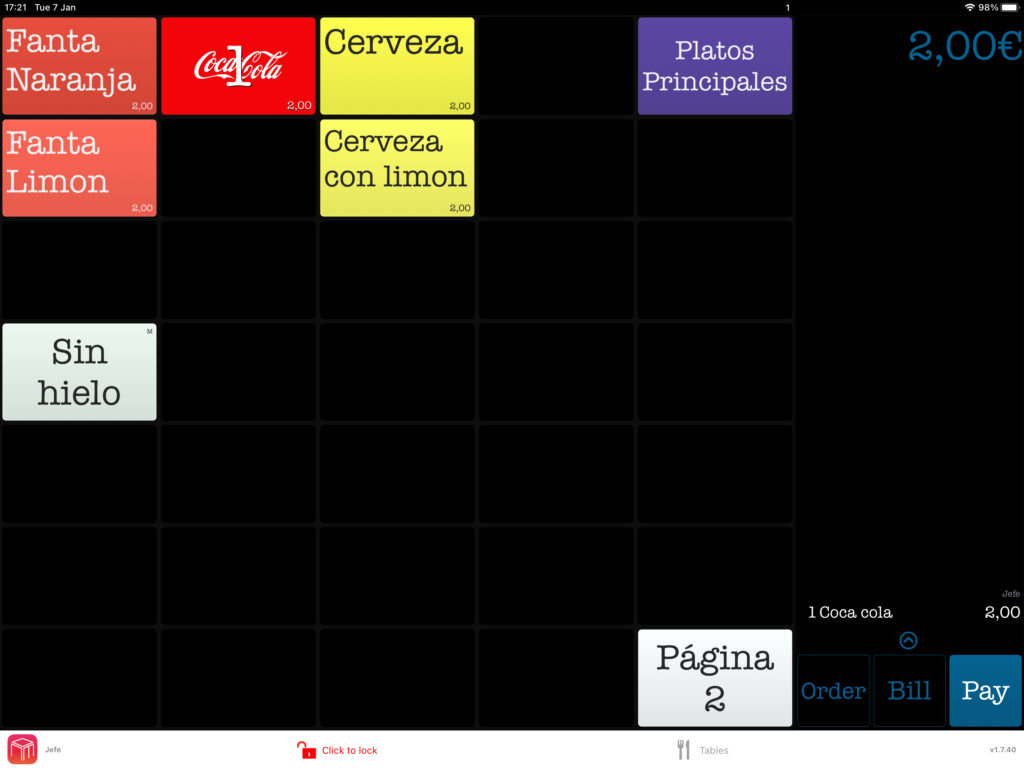
    We’re excited to introduce a new feature in WaiterOne: the ability to add images and pictures to your buttons! 🎉 This update lets you customize your interface like never before, making it more visually appealing and intuitive for your team.

    With this feature, you can:

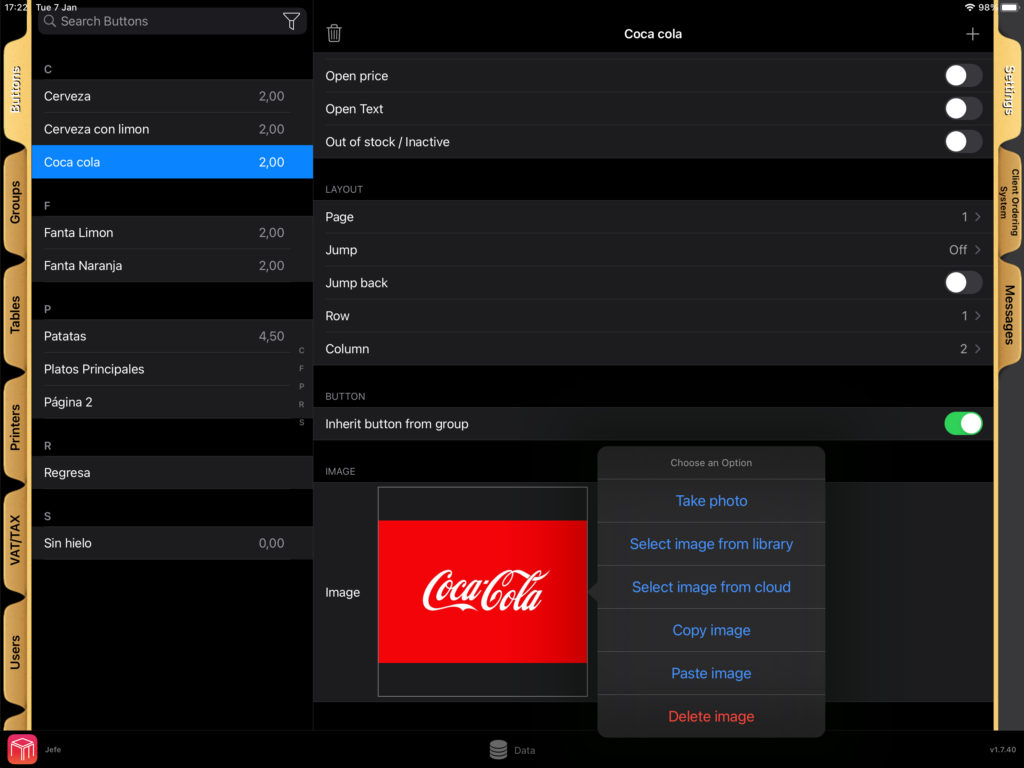
    • Upload images from your own library: Personalise buttons with photos or graphics that match your menu items or your brand.
    • Explore our cloud-based image library: Don’t have the perfect image? No problem! Browse through a variety of pictures available in our cloud and choose what works best for you.

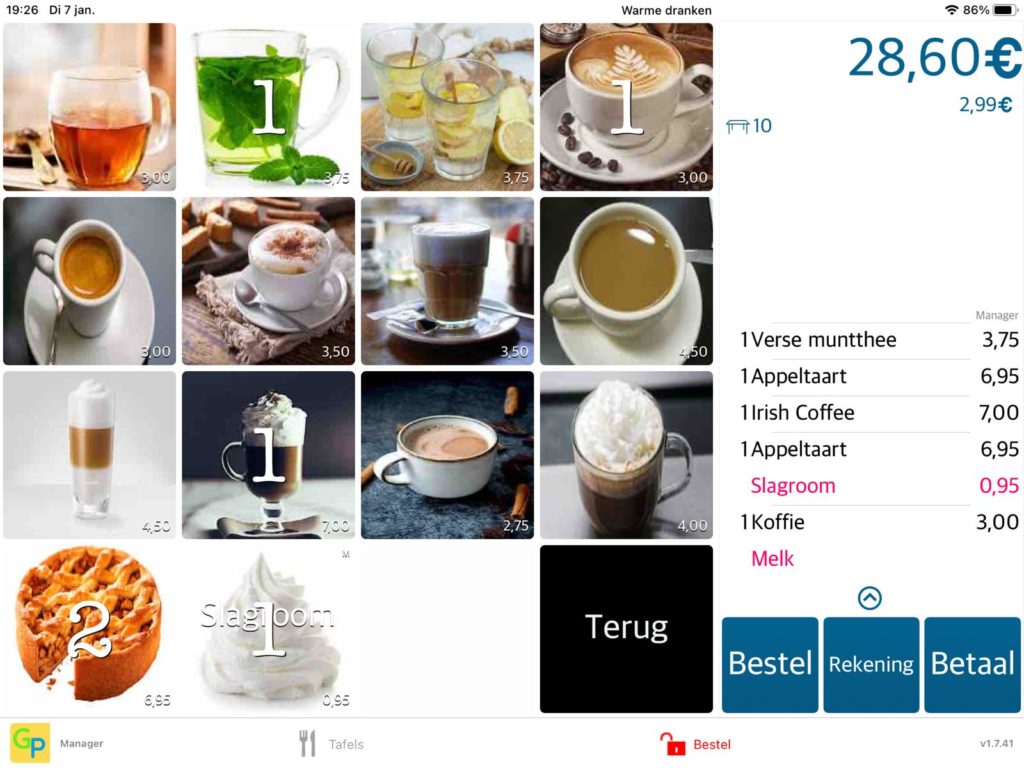
    This not only makes your buttons look great but also helps your staff work faster by instantly recognizing items at a glance.

    Take a look at some examples below to see how vibrant and user-friendly your interface can become:

    Logo on an button
    Add images to buttons

    Ready to give your buttons a makeover? Start adding images today and bring your POS to life! 🎨✨

    WaiterOne screen with images on buttons
  • Streamline Order Management with Colour-Coded Users

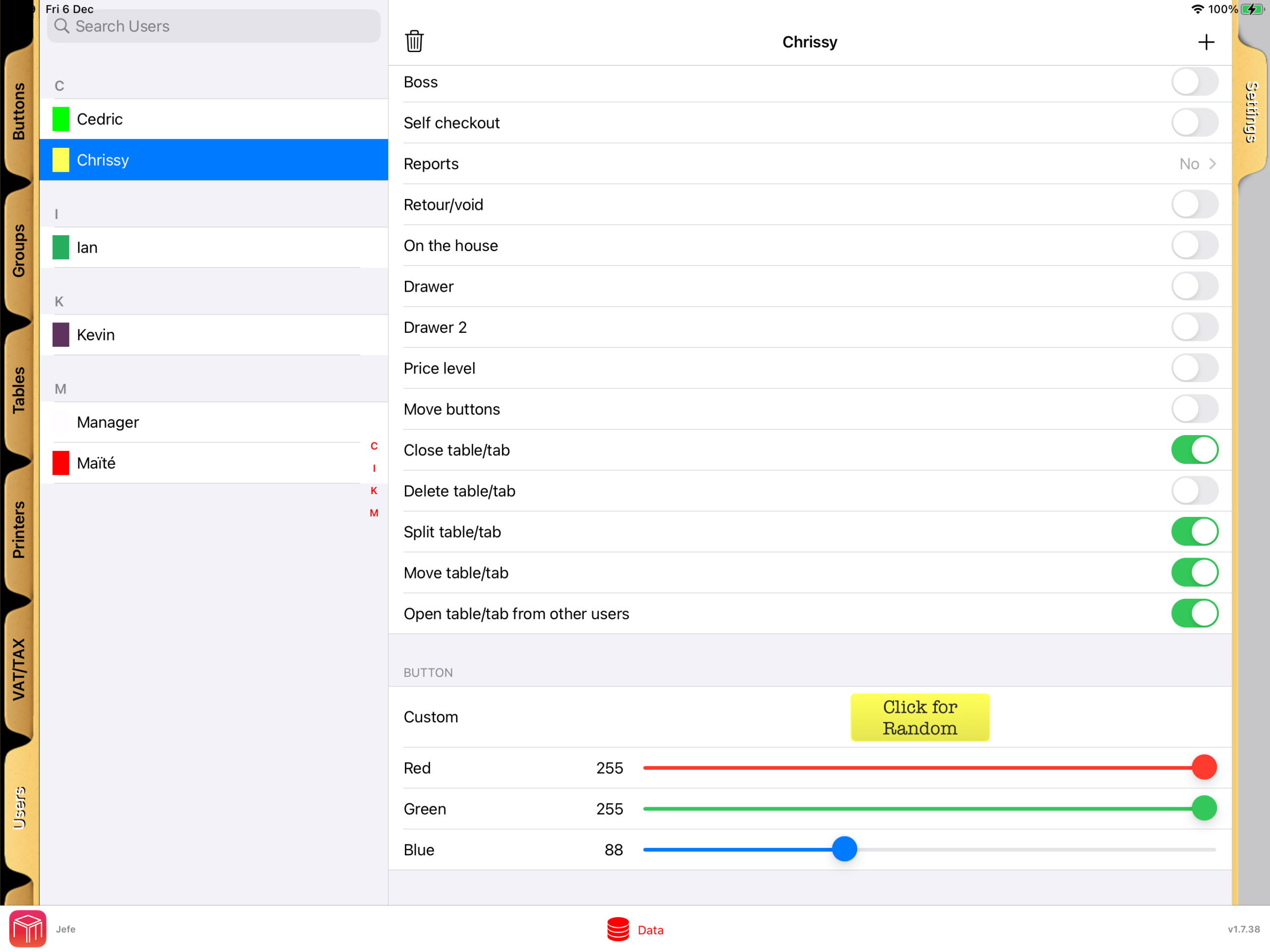
    With WaiterOne POS, managing your restaurant’s workflow becomes both intuitive and efficient. The system allows you to assign specific colours to users who are taking or entering orders, making it easy to quickly identify and prioritise tasks at a glance.

    User Rights and Table Plan Visibility

    User rights in WaiterOne.

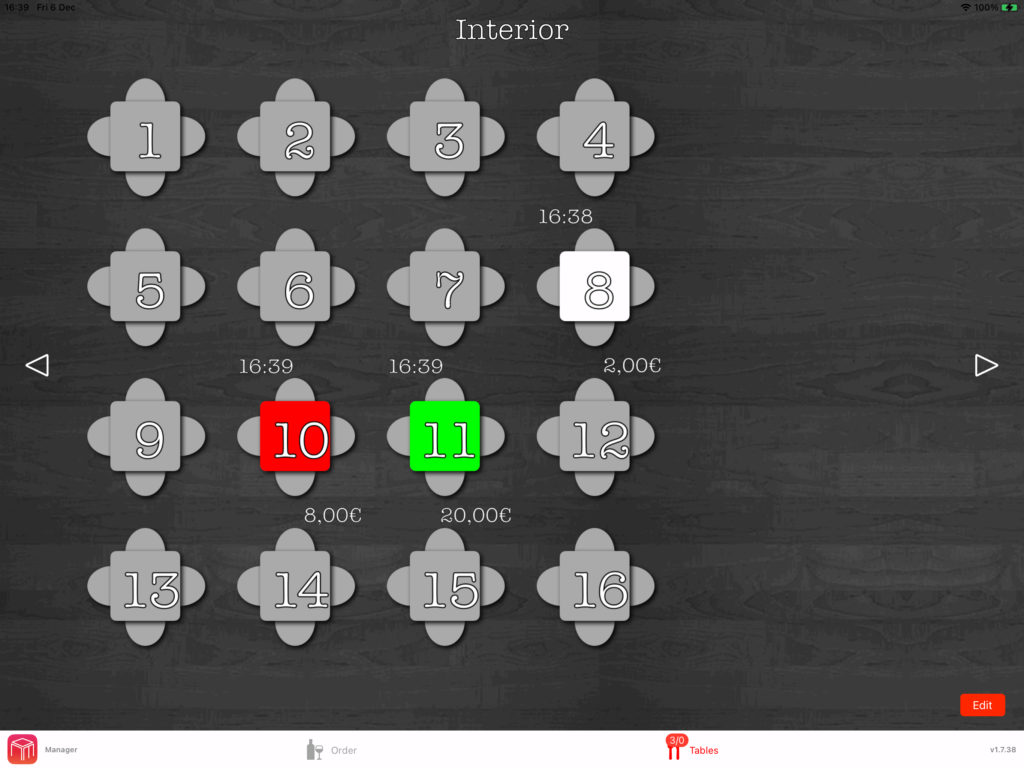
    In WaiterOne, each table on the floor plan is color-coded to match the user assigned to it. This visual cue lets you instantly see which server is responsible for each table.

    Table plan with tables in the colour of the user.

    Personalised KDS Settings

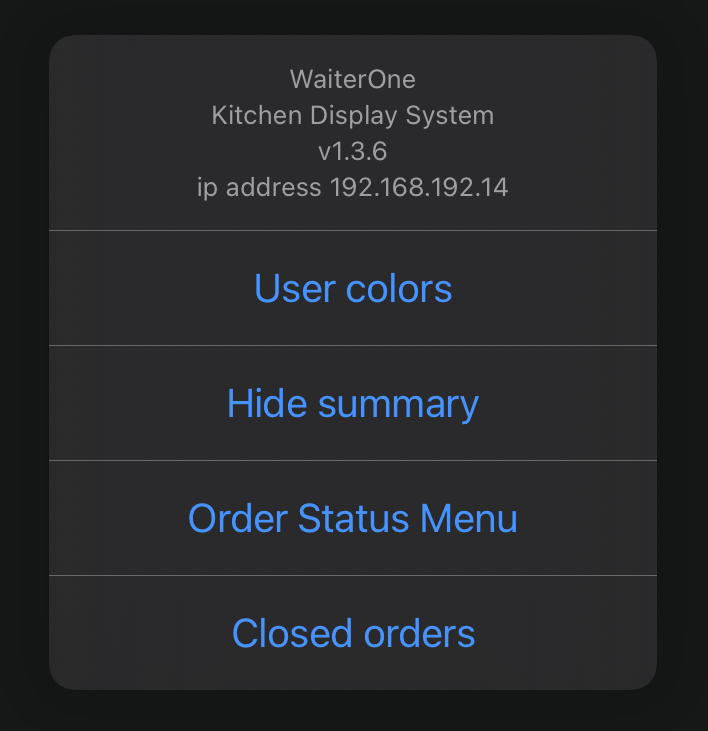
    On the Kitchen Display System (KDS), you can choose to display orders using the designated user colors or assign unique colors to each order. This customisation option ensures you can tailor the system to your workflow.

    Enhanced Communication Across Teams

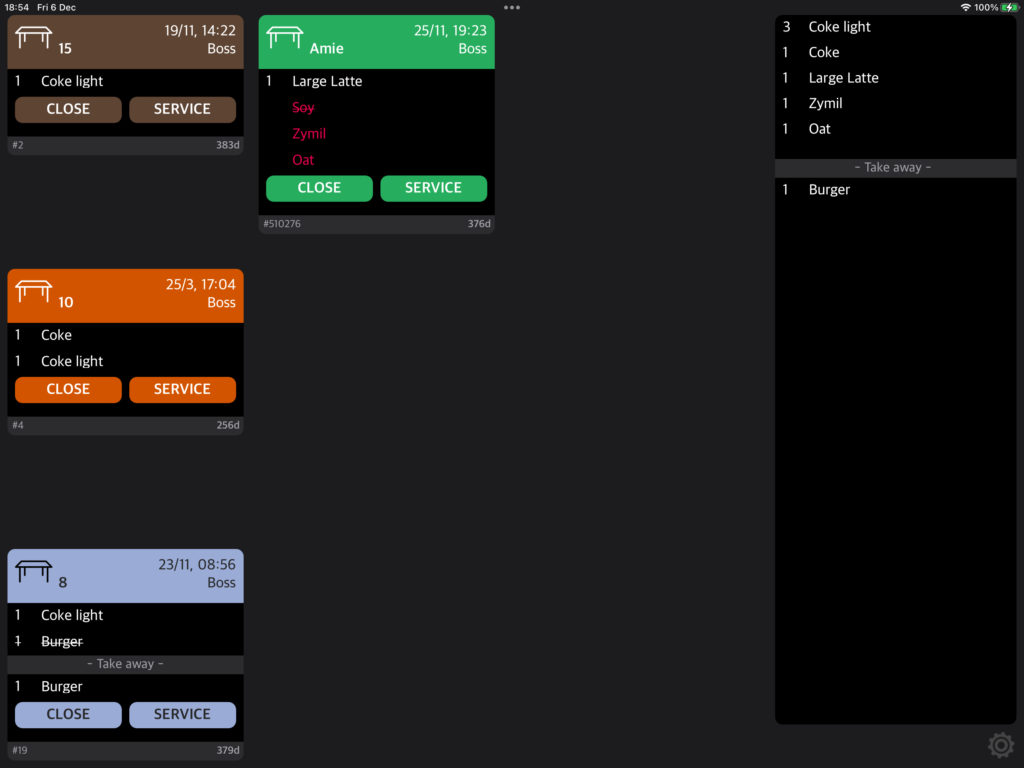
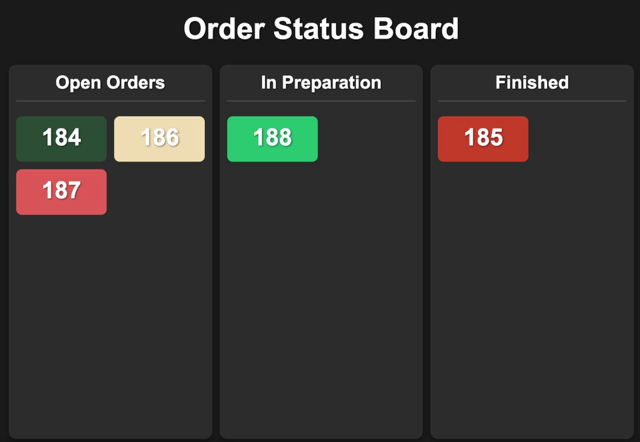
    The colour-coding system ensures seamless communication between front-of-house and back-of-house staff. When a user is assigned a specific color, it appears consistently across the status board and KDS, allowing everyone to stay aligned on order progress.

    Order status board with open, in preparation and finished orders.

    Better Organisation, Fewer Errors

    This integration enhances organisation and reduces the risk of errors, enabling your team to respond faster to customer needs. As a result, WaiterOne ensures a more streamlined dining experience, boosting customer satisfaction and improving operational efficiency.

  • Break Language Barriers with WaiterOne POS: Multilingual Support in 18 Languages

    In today’s global hospitality and retail environment, clear communication is key. Whether you’re running a local café in Amsterdam or a bustling restaurant in Bangkok, the ability to serve both staff and customers in their preferred language makes all the difference. That’s why WaiterOne POS offers powerful multilingual support, allowing you to operate smoothly across diverse markets.

    Speak Your Customer’s Language

    WaiterOne POS is equipped to run in 18 different languages, including:

    Chinese, Danish, Dutch, English, French, German, Greek, Italian, Japanese, Norwegian, Polish, Portuguese, Swedish, Russian, Serbian, Spanish, Thai, and Turkish

    This multilingual capability ensures that staff and customers alike can interact with the POS system in a way that feels natural and intuitive no confusion, no guesswork.

    A Game Changer for International Businesses

    For restaurants, cafés, and retail stores operating in multicultural or tourist-heavy areas, multilingual support is not just a bonus it’s a necessity. WaiterOne POS helps businesses:

    • Train international staff more easily
    • Enhance service speed and accuracy
    • Deliver better customer experiences
    • Build trust and loyalty across language lines

    Whether you’re running a tapas bar in Spain, a sushi counter in Japan, or a boutique in Norway, WaiterOne adapts to your team and your clientele.

    Effortless Setup, Seamless Experience

    Languages in WaiterOne POS can be set per device or per user, giving each team member the freedom to use the interface in the language they’re most comfortable with. This flexibility leads to:

    • Fewer mistakes at the point of sale
    • Faster onboarding for new staff
    • Improved team communication
    • A professional, localized service for customers

    Serve Globally, Operate Locally

    WaiterOne’s multilingual support makes it an ideal POS solution for franchise operatorsairport and hotel restaurantsinternational retail, and any business that wants to scale globally while keeping operations smooth locally.


    Ready to Go Multilingual?

    Break through language barriers and deliver world-class service, no matter where you are. Choose WaiterOne POS the smart solution for multilingual, modern businesses.

  • Unlimited Printer Integration at No Extra Cost At WaiterOne POS for Restaurants and Cafés.

    WaiterOne stands out as one of the best POS systems for restaurants and cafés by offering unlimited printer integration at no additional cost. This powerful feature allows restaurant owners to streamline operations, improve order accuracy, and eliminate service delays all without extra fees or licensing.

    Why Unlimited Printer Support Matters for Your Restaurant

    In fast-paced hospitality environments, printing orders to the right location is essential. With WaiterOne POS, you can connect multiple printers across your restaurant from the kitchen to the bar, the counter, or any custom station.

    • Improve kitchen workflow with direct ticket printing
    • Send drink orders instantly to the bar
    • Keep front-of-house staff organized and efficient

    All of this happens automatically and seamlessly, supporting both small cafés and high-volume restaurants.

    No Limits, No Hidden Fees

    Unlike many POS systems that charge per device or printer, WaiterOne includes unlimited printer support by default. There are no monthly add-onsno per-printer charges, and no surprises. This makes it an ideal POS for growing businesses that need flexibility without increased costs.

    Built for Restaurants of All Sizes

    Whether you operate a small coffee shop or a multi-room fine dining restaurant, WaiterOne adapts to your needs. Unlimited printer integration helps:

    • Eliminate order bottlenecks
    • Enhance kitchen communication
    • Speed up service delivery
    • Reduce manual errors

    A Cost-Effective POS System That Scales with You

    WaiterOne POS is more than a point of sale system it’s a complete restaurant management tool. With support for unlimited printers, you gain the ability to scale your operations without worrying about added expenses or configuration limits.

    Optimize Your Restaurant Workflow Today

    If you’re looking for a flexible, scalable, and cost-effective POS system, WaiterOne is the solution. Say goodbye to printer limits and hello to efficient, streamlined service.

  • Why Pay More? Get Full POS Power with WaiterOne for Just €20/Month

    Running a restaurant or bar is challenging enough your POS system shouldn’t add to the stress. At just €20 per monthWaiterOne offers powerful, affordable, and no-nonsense technology that’s built for hospitality professionals who want performance, not problems.

    No Expensive Hardware Required

    Forget bulky terminals, crash prone PCs, or overpriced touchscreen systems. WaiterOne is designed to run on your iPad, giving you the power of a professional-grade POS without the need for high-end, high-maintenance hardware.

    • 🚫 No slow Windows PCs
    • 🚫 No costly touchscreens
    • ✅ Just your iPad and our software

    No Internet? No Problem.

    One of the biggest advantages of WaiterOne is that it runs locally on your iPad. Even if your internet connection goes down, your POS won’t.

    • 🌐 Works entirely offline
    • 📲 Even handhelds keep working
    • 🧠 No cloud dependency for critical functions

    Unlike cloud-based systems that freeze up when your Wi-Fi drops, WaiterOne keeps your service smooth and uninterrupted exactly what you need in a busy shift.

    No Hidden Costs or Bloating Back-Office Modules

    Some POS providers reel you in with base prices, only to add costs for essential features like reporting or back-office control often tied to expensive SQL server licenses.

    With WaiterOne, you get everything in one. No extra software. No hidden modules. No need for IT technicians to set it up or keep it running.

    • 💾 No SQL Server licenses
    • 🔌 No need for external IT support
    • 💼 No pricey service contracts

    Stable, Efficient, and Easy to Support

    WaiterOne is built for speed and simplicity. It doesn’t bog down over time or require constant servicing. If something goes wrong, it’s usually a minor iPad issue and most times, it can be solved without calling in expensive technical support.

    This minimalist approach is a game-changer in an industry where most POS solutions are overengineered and oversold.

    We Know You’re Comparing. That’s Okay.

    Looking at other POS systems? We understand. But once you factor in:

    • 💰 The monthly fee
    • 🔧 Hardware and support costs
    • 🧩 Complexity of setup and maintenance
    • 🌐 Reliability without internet

    …you’ll quickly see why so many hospitality businesses are switching to WaiterOne.


    The Smarter Choice for Hospitality

    At WaiterOne, we don’t rely on flashy sales tactics or unnecessary add-ons. We offer a clean, stable, affordable POS system that just works designed to keep your business moving, not tied up in tech issues.

    Whether you run a bustling restaurant, a beach bar, or a cozy café, €20/month is all it takes to put full POS power in your hands.

    Ready to keep it simple? Visit waiterone.net and discover the smarter way to run your business.

  • Take Control of Orders with WaiterOne’s COS (Client Ordering System)

    Take Control of Orders with WaiterOne’s COS (Client Ordering System)

    Imagine this: your customers scan a QR code, browse your menu, place their orders, and even pay all from their own smartphone. No apps to download, no tablets to hand out. That’s the power of WaiterOne’s COS, our streamlined Client Ordering System designed to supercharge restaurant service both in-house and online.

    What Is COS?

    COS is a web-based platform that lets your customers order directly from their phones—whether they’re seated at a table, ordering takeaway, or getting delivery. Built to integrate directly with WaiterOne, COS ensures a seamless experience from order to kitchen, without the chaos of paper tickets or miscommunication.

    Why We Built It

    The journey began with iPads at every table, but that quickly became impractical. We pivoted to something much smarter: leveraging the power of the device every customer already has—their smartphone. After extensive development, COS became a universal web app that runs anywhere, on any browser, no downloads required.

    Key Features of COS

    • 📱 Runs on any device: Smartphones, tablets, or desktop computers.
    • 🧩 Fully integrated with WaiterOne: No need to re-enter your menu. Your existing buttons and groups are synced.
    • 🏠 In-house or remote: Whether it’s a table-side order, pick-up, or delivery, COS handles it all.
    • 💳 Online payments: Integrated with Mollie for fast, secure transactions.
    • ⚡ Real-time updates: Orders arrive in WaiterOne instantly and can print directly to kitchen or bar printers.

    How It Works for Your Customers

    1. Scan a QR code (on a table, receipt, or your website).
    2. View the menu directly from their browser.
    3. Place the order with optional payment.
    4. Order arrives in WaiterOne, with full details and kitchen printouts.

    For dine-in, we even include service buttons clients can request the bill or call a server, all without leaving their seat.

    Simple Setup, Powerful Configuration

    From your WaiterOne iPad:

    • Activate the Client Ordering System.
    • Select which menu groups and items appear online.
    • Upload images, descriptions, and organize menu priority.
    • Choose delivery settings, pick-up options, and tax configurations.
    • Customize your COS page branding (logo, text, tags, colors).

    Want to offer different prices for delivery vs. dine-in? COS handles that. Need multiple VAT levels for local compliance? Done. Want to add a beautiful picture of your famous tiramisu? Just take a photo right inside WaiterOne.

    Smart QR Codes for Every Situation

    WaiterOne automatically generates:

    • 📦 Delivery/pick-up QR codes for takeaway flyers or website links.
    • 🍽️ Table QR codes that identify the exact table where the order came from (even printing the table name).

    No extra software or QR code generators needed.

    Where Orders Go: The COS Page in WaiterOne

    All incoming orders appear in the COS tab inside WaiterOne. From there, you can:

    • Accept or reject orders
    • Automatically send them to the kitchen
    • View deleted or missed orders
    • Check system status manually

    It’s a familiar interface, modeled after our Kitchen Display System (KDS), so your team can use it with zero learning curve.


    Ready to Let Your Clients Order Smarter?

    COS is your gateway to faster, smarter, and more customer-friendly service. Whether you run a local café or a busy multi-location restaurant, COS gives you a modern, elegant way to connect with today’s tech-savvy diners at the table or at home.

    Visit https://www.waiter.one to see it in action or activate it today directly inside WaiterOne.

    WaiterOne allows easy QR code integration, enabling customers to scan, view the menu, and place orders directly from their mobile devices. This enhances service speed, reduces contact, and improves the overall dining experience. Under settings, you can find this feature.

  • Real-Time Order Tracking with Order Status Board

    Real-Time Order Tracking with Order Status Board

    Boost Kitchen Efficiency with the WaiterOne Status Board

    In the fast-paced world of hospitality, timing and communication are everything. That’s why we’re excited to spotlight a feature in WaiterOne’s Kitchen Display System (KDS) that’s transforming back-of-house operations: the Status Board.

    What Is the Status Board?

    The Status Board is a live dashboard within WaiterOne’s KDS that gives a real-time overview of all active orders. Designed with both speed and clarity in mind, it displays each order as it moves through the preparation pipeline from “In Preparation”, to “Ready”, and finally to “Completed”.

    It’s a visual command center that keeps everyone chefs, waitstaff, and even front-of-house managers on the same page.

    Why It Matters

    Without a centralized system, orders can easily fall through the cracks. Waiters might ask the kitchen for updates. Chefs might have to pause their workflow to give answers. Customers might wait longer than necessary. But with the Status Board:

    • 🧑‍🍳 Kitchen staff can focus on cooking, while tracking progress without the need for paper tickets or verbal confirmations.
    • 👩‍💼 Restaurant managers get a clear, live view of operations even from the dining room.
    • 🍽️ Clients receive their food faster and fresher, with fewer delays and mix-ups.

    Real-Time, Real Simple

    As orders are received in the kitchen (whether from a waiter using the WaiterOne POS or a self-ordering iPad at the table), they instantly appear on the Status Board. Once a dish is prepared, kitchen staff can tap to mark it “Ready”, signaling the front-of-house team to serve. When the dish reaches the customer, the status moves to “Completed”.

    It’s fast. It’s clear. And it reduces the need for spoken communication during peak hours helping everyone stay focused and efficient.

    Benefits at a Glance

    • ✅ Fewer mistakes: Everyone sees the same order status, reducing the chance of missed or repeated dishes.
    • ✅ Faster service: Orders are prioritized and served without delay.
    • ✅ Smarter communication: No shouting across the kitchen — just a glance at the screen.
    • ✅ Customer satisfaction: A smoother workflow means a better dining experience.

    Ready to Upgrade Your Kitchen?

    If you’re already using WaiterOne, activating the Status Board on your KDS is a simple and powerful way to streamline your kitchen workflow. Whether you’re running a cozy café or a high-volume restaurant, this feature can help you serve faster, smarter, and with more confidence.