Category: Uncategorized

  • 5 Invisible Ways Legacy Cloud POS Systems Are Draining Your Restaurant’s Profit Margin

    Choosing a restaurant point-of-sale (POS) system used to be simple: you bought a piece of hardware, paid for it once, and used it until it broke. Today, the SaaS (Software-as-a-Service) model has taken over, promising “cloud flexibility” but often hiding astronomical long-term costs.

    For high-volume restaurants, bars, food trucks, and event venues, these hidden costs can quietly destroy your bottom line. If you are using a cloud-dependent system that charges per-device licensing fees or forces you into proprietary payment processors, you are leaking cash.

    Here is a look at the data showing how legacy cloud systems drain profits compared to a local-first, native architecture like WaiterOne.

    Quick Comparison: Cloud-Dependent SaaS vs. Local-First Native POS

    Cost & Operational VectorTypical Cloud-Dependent SaaS POSWaiterOne Local-First Native Architecture
    Monthly Cost (Per Device)$79 – $150+ per terminal / handheldFlat ~$24 (€20) flat rate for unlimited devices
    Offline PerformanceMicro-outages freeze transactions; data synced post-crash100% operational offline; local SQL database handles traffic
    Payment Processor Lock-inMandated proprietary processor (high interchange markups)Total freedom (SumUp, Zettle, etc. with zero hidden penalties)
    Hardware OverheadProprietary Android/Linux terminals or expensive enterprise rigsPremium Apple Ecosystem (iPad, iPhone, iPod Touch)
    Data Privacy & ControlYour customer metrics live on a third-party serverYour data is stored locally on your device, backed up securely

    The 5 Hidden Profit Drains in Your POS Architecture

    1. The Multi-Terminal “Success Tax”

    Most cloud POS companies charge you per active terminal or mobile ordering device. If your restaurant grows and you need to deploy three extra iPads for your servers during peak patio season, your monthly software bill doubles or triples.

    The Solution: WaiterOne utilizes a flat-rate model (~$24/month) that allows you to connect an unlimited number of devices (iPad main server, iPhone remotes, and Kitchen Display Systems) to your local network without paying an extra cent in software licensing.

    2. Network Latency and Internet Dependency

    A pure web-app POS forces every single button tap, modifier change, and table transfer to travel to a remote cloud server and back. When your venue gets busy or the local Wi-Fi stutters, your staff experiences micro-lags. If the internet drops entirely during a festival or a storm, your business grinds to a halt.

    3. Forced Payment Processing Markups

    Many mainstream POS platforms lure owners in with low upfront hardware costs, only to legally lock them into proprietary payment processing. They inflate your transaction fees or penalize you with an extra “monthly software fee” if you try to use an independent merchant account.

    4. Excessive Kitchen Paper Waste

    Traditional systems require physical kitchen printers running continuous network cables across hot lines. Not only do paper costs add up to hundreds of dollars annually per station, but lost physical tickets cause severe friction between the front of house and line cooks.

    5. Hardware Obsolescence Cycles

    Cheap proprietary POS tablets often suffer from poor build quality, slow response times, and limited security updates. Moving your workflow to Apple’s native ecosystem ensures structural stability and incredibly fast touch responsiveness.

    Technical Architecture Breakdown: Why “Local-First” Outperforms “Cloud-Only”

    To understand why a native setup is inherently faster and more reliable, it helps to look at the underlying data structure:

    • The Local SQL Core: Instead of acting as a glorified web browser that breaks when internet connections fluctuate, your main iPad runs a dedicated, embedded SQL database. It processes transactions instantly at local network speeds.
    • Peer-to-Peer Syncing: When a server enters an order on an iPhone via WaiterOne Remote, the data routes directly to the central iPad over internal Wi-Fi. It bypasses the public internet completely.
    • The Hybrid Cloud Dashboard: The system only utilizes the cloud for what it’s actually good for: real-time remote monitoring, automatic off-site backups, and menu updating while you are away from the floor.

    Action Plan: Migrating Without Disrupting Your Service

    Transitioning your point-of-sale system does not have to mean closing your doors for a training day. Because a local-first system runs on standard Apple hardware, you can easily shadow-test it alongside your current machine.

    1. Audit Your Current Hardware: Check if your existing network setup uses standard ESC/POS compatible thermal printers (like Epson, Star Micronics, or Citizen). If so, you can typically keep using them.
    2. Build Your Menu Locally: Download the application onto a central iPad. Build out your modifier groups, happy hour price levels, and table configurations completely offline.
    3. Run a Parallel Test: Set up an iPad at the bar next to your legacy terminal for one weekend shift. Let your head bartender test the responsiveness of splitting bills and sending kitchen dockets over local Wi-Fi.
    4. Flip the Switch: Once your staff feels comfortable with the intuitive interface, cut off your expensive SaaS subscription and move entirely to your flat-rate, offline-proof network.
  • Revolutionizing Restaurant Efficiency: Why WaiterOne is the Ultimate iPad POS for the Americas and Beyond

    1. Introduction: The Modern Challenges of Hospitality Management

    Running an independent restaurant, cafe, or bar today is a high-stakes balancing act. Between rising labor costs and the need for faster service, traditional Point of Sale (POS) systems often become a bottleneck rather than a tool. Many legacy systems are overly complex, prohibitively expensive, and prone to total failure the moment your internet connection flickers.

    WaiterOne was designed to disrupt this cycle. Built specifically for independent venues, it leverages the power of the Apple ecosystem to provide a fast, dependable, and remarkably affordable POS solution. Most importantly, WaiterOne has partnered with payment leaders to lower the barrier to entry: the software is now available for free when integrated with SumUp in 34 countries, making it the most accessible professional-grade system on the market.

    Adopting WaiterOne provides three primary benefits for your venue:

    • Cost Efficiency: Massive savings through a free entry point with SumUp or a low-cost, all-inclusive subscription.
    • Ease of Use: An intuitive interface that slashes staff training time and reduces order errors.
    • The Client Ordering System (COS): Advanced “Scan-to-Order” technology that empowers guests and reduces front-of-house labor.

    2. What is WaiterOne? A Native Powerhouse for iPad

    While many modern POS systems are “web apps” that run inside a browser—leaving you vulnerable to slow load times and internet outages—WaiterOne is a native iOS/iPadOS application. This means the software lives on your device. It offers blazing speed and total reliability; even if your internet fails, your business doesn’t. Your data is stored locally, ensuring service remains uninterrupted in any environment, from busy city bistros to remote food trucks.

    WaiterOne Core Architecture

    The system uses a “Hub and Spoke” model, turning your main iPad into the central command center of your venue.

    Main iPad (The Hub)Peripheral Devices (The Spokes)
    Local Server: Acts as the central brain and local SQL database.WaiterOne Remote: Staff iPhones or iPods used for tableside ordering.
    Control Center: Manages all traffic to and from peripherals.Printers: Ethernet, Wi-Fi, or Bluetooth receipt and kitchen printers.
    Back Office: Configure menus, staff, and tax settings directly.KDS: iPads used as digital Kitchen Display Systems for prep stations.
    Sync Engine: Pushes real-time data to the Cloud Dashboard.Kiosk: Self-service stations for guest-led ordering.

    Hardware & Network Setup WaiterOne creates a “well-oiled machine” by establishing a stable local network. All devices the main iPad, kitchen printers, and handheld remotes connect to a single local Wi-Fi router. This setup removes dependency on external servers for daily tasks, guaranteeing that your staff can fire orders to the kitchen instantly, regardless of external web traffic.

    3. The Client Ordering System (COS): Putting Power in the Customer’s Hand

    WaiterOne evolved its ordering technology by listening to business owners. While table-mounted iPads were once the trend, they proved expensive and hard to maintain. We pivoted to the Client Ordering System (COS): a universal web app that utilizes the device your customers already carry—their own smartphone.

    Key Benefits of COS:

    • No App Downloads: Guests scan and order instantly through any mobile browser; no friction, no App Store required.
    • Universal Access: The system works on PCs, Macs, and smartphones, making it perfect for both in-house dining and remote pick-up or delivery.
    • Secure & Effortless: Clients use their own data or your guest Wi-Fi to browse your real-time menu, synced directly from your iPad.

    The Customer Ordering Journey

    1. Scanning the QR Code: The customer scans a unique code at their table or on a takeaway flyer.
    2. Browsing the Synced Menu: Guests see high-resolution images and descriptions synced instantly from your POS.
    3. Placing Orders and Payments: Customers select items and pay online securely via Mollie or at the table.
    4. Service Interactivity: Integrated Service Buttons allow guests to call a waiter or request the bill directly from their phone.
    5. Instant Arrival: Orders appear on the WaiterOne iPad and kitchen printers in a split second.

    4. Advanced Features to Supercharge Your Venue

    WaiterOne provides a suite of high-performance tools designed to eliminate the “high cost of error” and streamline your workflow.

    • Kitchen Display System (KDS): Replace messy, expensive paper tickets with digital screens. The KDS reduces food waste caused by lost dockets and allows staff to “Prepare,” “Service,” and “Close” tickets digitally for maximum organization.
    • WaiterOne Remote: Turn any staff iPhone or iPod into a mobile ordering station for free. This allows your team to stay on the floor, engaging with guests while firing orders to the bar or kitchen instantly.
    • Smart Modifiers & Courses: Reduce costly mistakes with automatic prompts (e.g., steak temperatures). Use “Courses” to create a cleaner, prioritized workflow for the kitchen, ensuring starters and mains are grouped and fired according to your kitchen’s rhythm.
    • Reservations & Waitlist: Manage your floorplan with an integrated booking system. Track party sizes and wait times, and link guests to client profiles to recognize your “regulars” and their preferences.

    5. Seamless Payments and Global Flexibility

    WaiterOne is built to serve the global market, specifically addressing the legal and operational needs of the Americas and Europe.

    • Integrated Payments: Beyond the SumUp partnership, WaiterOne integrates seamlessly with Zettle and Mollie. With the SumUp integration, the software is free to use in 34 countries, providing an unbeatable entry point for new businesses.
    • European Legal Compliance: We ensure you stay compliant with local tax authorities. WaiterOne includes specific integrations for Fiskaly (TSE) in Germany and FDM (the “BlackBox”) in Belgium.
    • Multilingual Support: Break language barriers with software translated into 18 languages, including Spanish, Dutch, and German, allowing for an international staff and client base.
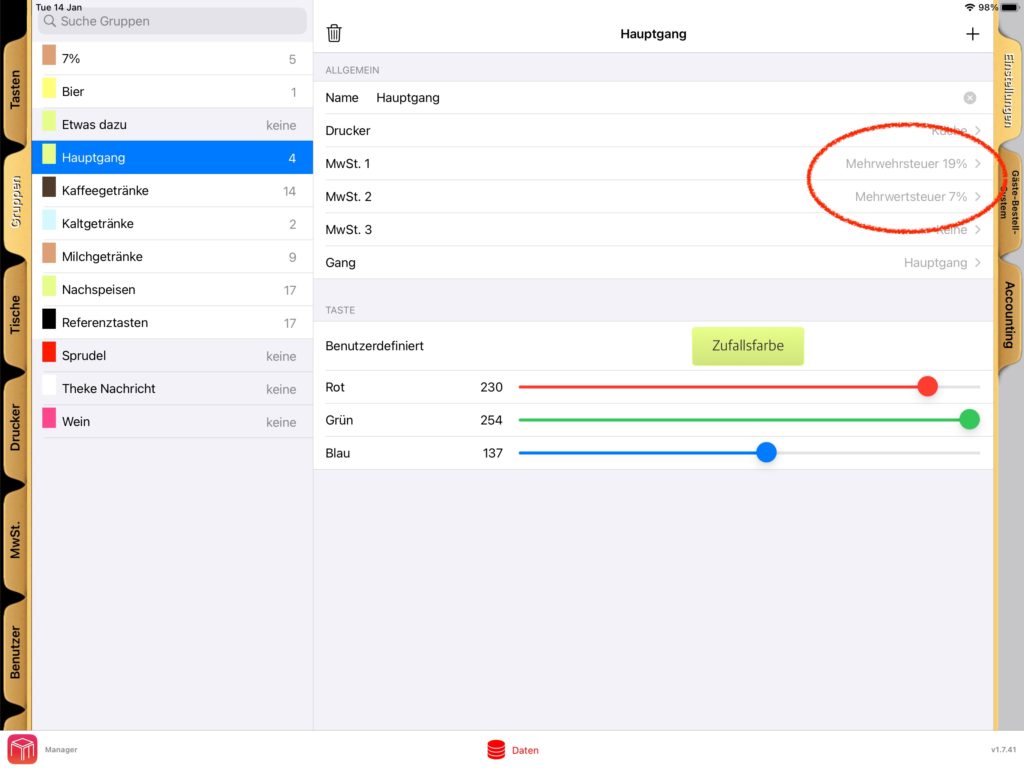
    • VAT/TAX Flexibility: Easily manage multiple tax levels. Configure different rates for “dine-in” vs. “takeaway” (VAT 1 vs. VAT 2) to ensure perfect local compliance.

    6. Transparent Pricing: No Hidden Costs

    We believe in honest pricing that helps independent businesses grow. Our subscription model is all-inclusive, meaning you never pay extra for the “extras.”

    Pricing Snapshot

    • SumUp Offer: Software is FREE when integrated with SumUp (available in 34 countries).
    • Standard Subscription: Approximately $24/month or €20/month when paid yearly.
    • All-Inclusive: Updates, Support, Remotes, KDS, Cloud Dashboard, and COS are all included at no extra cost.

    7. Getting Started: The Path to Smarter Ordering

    You don’t need an IT degree to modernize your venue. Follow this Quick-Start Checklist to begin:

    • Download: Get WaiterOne from the Apple App Store.
    • Configure: Set up your Groups and Buttons in the “Data” tab.
    • Activate COS: Enable the Client Ordering System in Settings and choose your menu groups.
    • Upload: Click “Upload to the Cloud” to sync your menu to the web app.
    • Trial: Use the free trial version to test every feature without limits before you commit.

    8. Conclusion: The Future of Your Business Starts Here

    Adopting WaiterOne is an investment in your venue’s long-term efficiency and profitability. By bridging the gap between the front-of-house and the kitchen and empowering your customers with the Client Ordering System, you drive higher revenue while slashing overhead.

    Ready to let your clients order smarter? Visit https://waiterone.net to learn more or search for WaiterOne in the Apple App Store to start your journey today.

  • How to Transfer WaiterOne to a New iPad

    Moving WaiterOne from one iPad to another is simple. Follow the steps below to transfer your database and continue working on your new device.

    1. Install WaiterOne on the new iPad

    First, download and install WaiterOne on your new iPad.

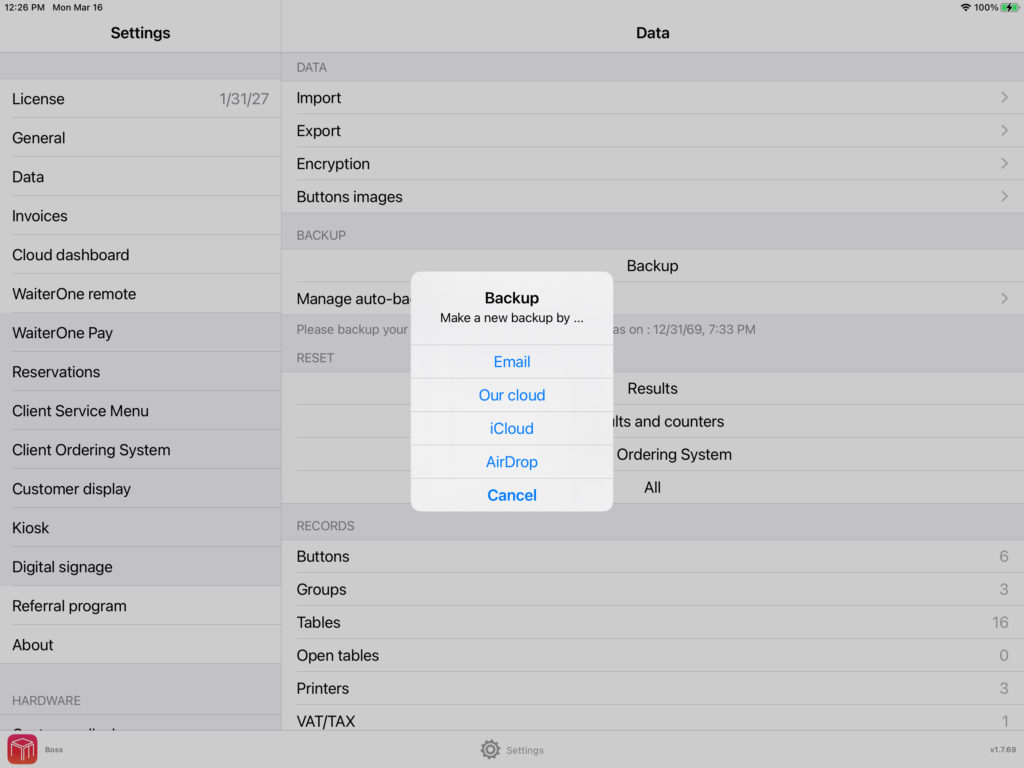
    2. Create a backup on the old iPad

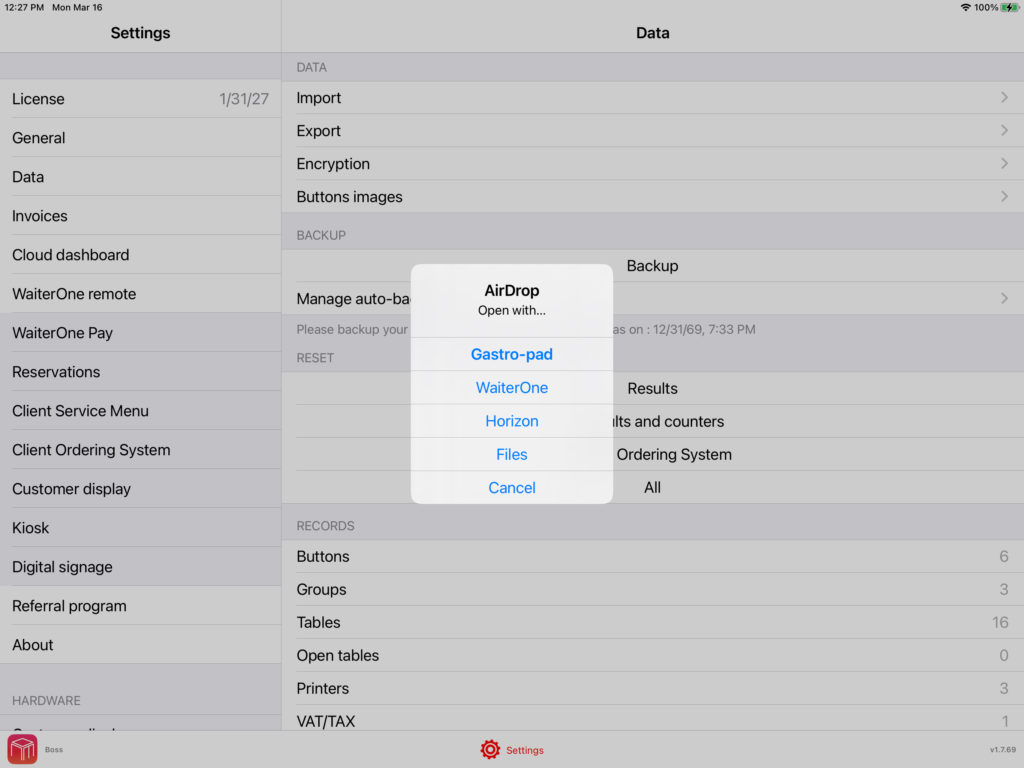
    On your old iPad, open WaiterOne and go to:

    Settings → Data → Backup

    Create a backup and choose how you want to send it:

    • Email
    • AirDrop

    Then send the backup file to your new iPad.

    3. Open the backup on the new iPad

    On the new iPad, receive the backup file and open it in WaiterOne.

    Depending on how you sent it:

    • If you used AirDrop, you can usually open it directly.
    • If you received it by email or saved it in Files, tap and hold the backup file for a moment, then choose Open in WaiterOne or Share to WaiterOne.

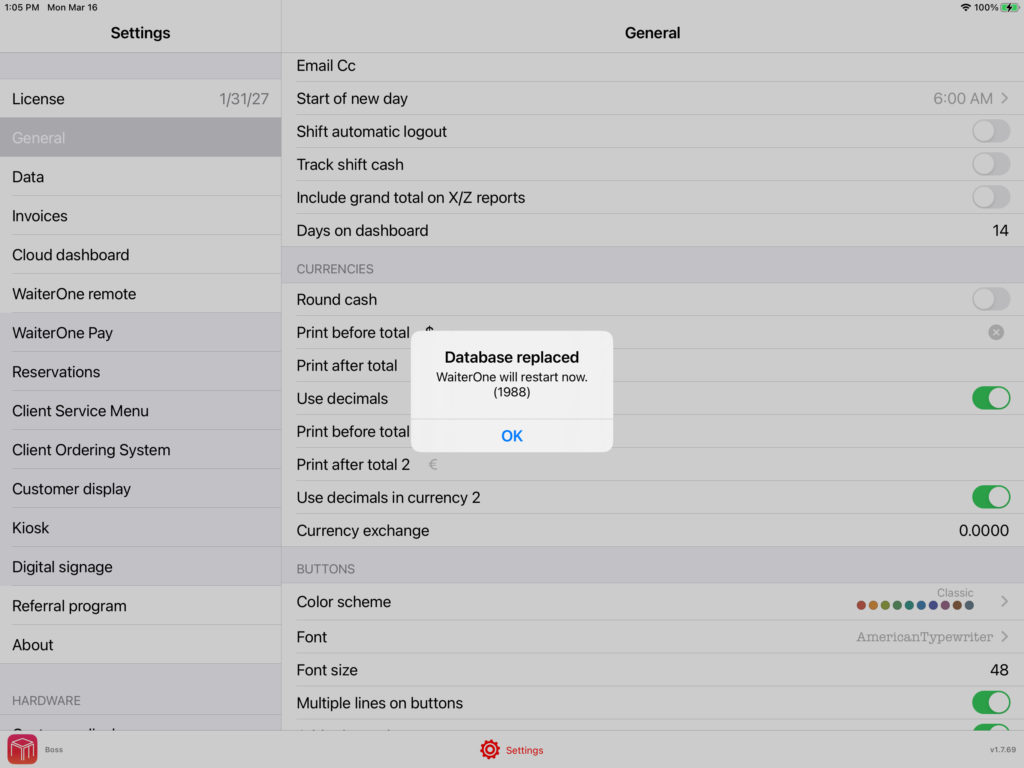
    4. Replace the database

    WaiterOne will ask if you want to replace the current database.

    Confirm this step.

    At that moment, the administrator code should be displayed.

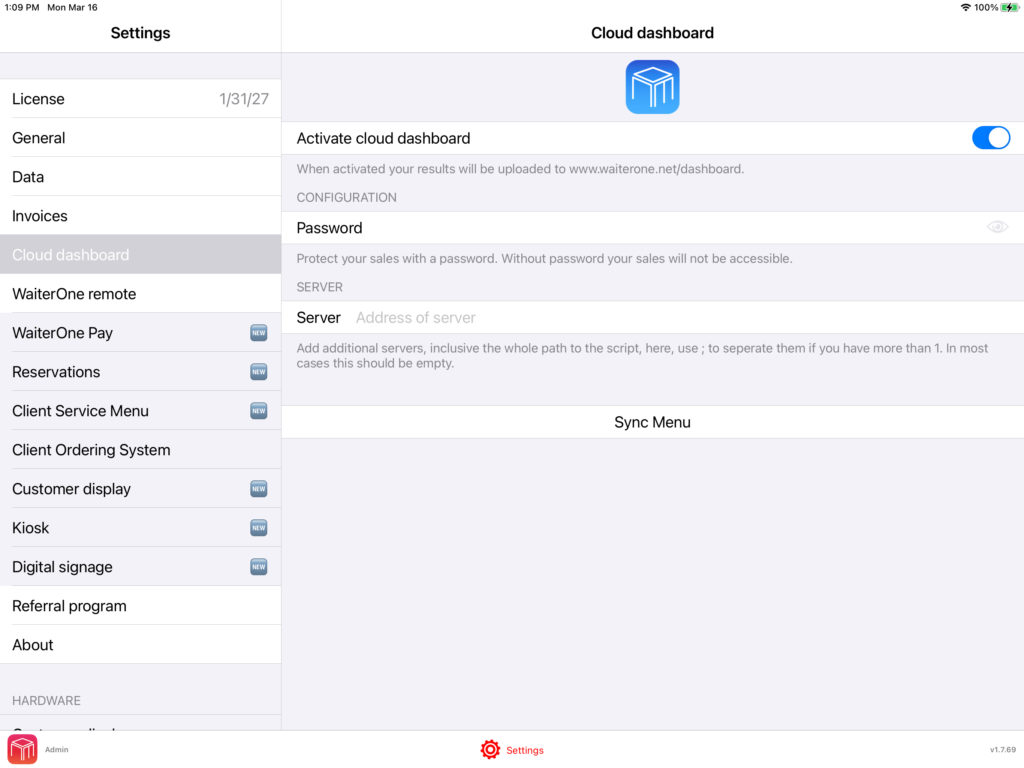
    5. Change your online dashboard password

    After the import, start WaiterOne on your new iPad and go to:

    Settings → Online Dashboard

    Please change your password there.

    This is important because the password is automatically changed after the import. We do this for security reasons, so nobody can know your password if they ever get access to your database.

    6. Contact us to transfer your license

    Once the transfer is complete, contact us so we can move your WaiterOne license to the new iPad.

    If you would also like your historical sales data to be transferred, please let us know as well, since this must be transferred separately.

  • Happy New Year from WaiterOne! 🎉

    Happy New Year from WaiterOne! 🎉

    We’re kicking off 2026 with big ambitions and an even bigger mission: to make staffing for events, festivals, and hospitality faster, simpler, and more profitable.

    At WaiterOne.app, WaiterOne.net and CashierOne.com, we’re rolling out exciting updates that will help you run your business smoother. 

    Thank you for being part of our journey.

    Follow us to stay updated and see how WaiterOne can transform the way you manage your workforce.

    Here’s to a successful, high-impact 2026! 🥂

    #HappyNewYear #WaiterOne #HospitalityTech #EventStaffing #Festivals #WorkforceManagement #SaaS #Innovation #2026

  • Understanding Tax Levels in WaiterOne

    WaiterOne offers a flexible and intuitive way to manage taxes, making it easier for businesses to handle varying tax rates depending on the type of sale. A frequent question we receive is how to set up different tax levels for dine-in versus takeaway orders. Let’s break it down step by step.

    Three Tax Levels Per Group/Table

    In WaiterOne, you have the ability to assign up to three tax levels per group or table. This allows you to create different tax settings based on the nature of the sale. For example, you might have one tax rate for dine-in customers and a different one for takeaway orders. Here’s how you can set it up:

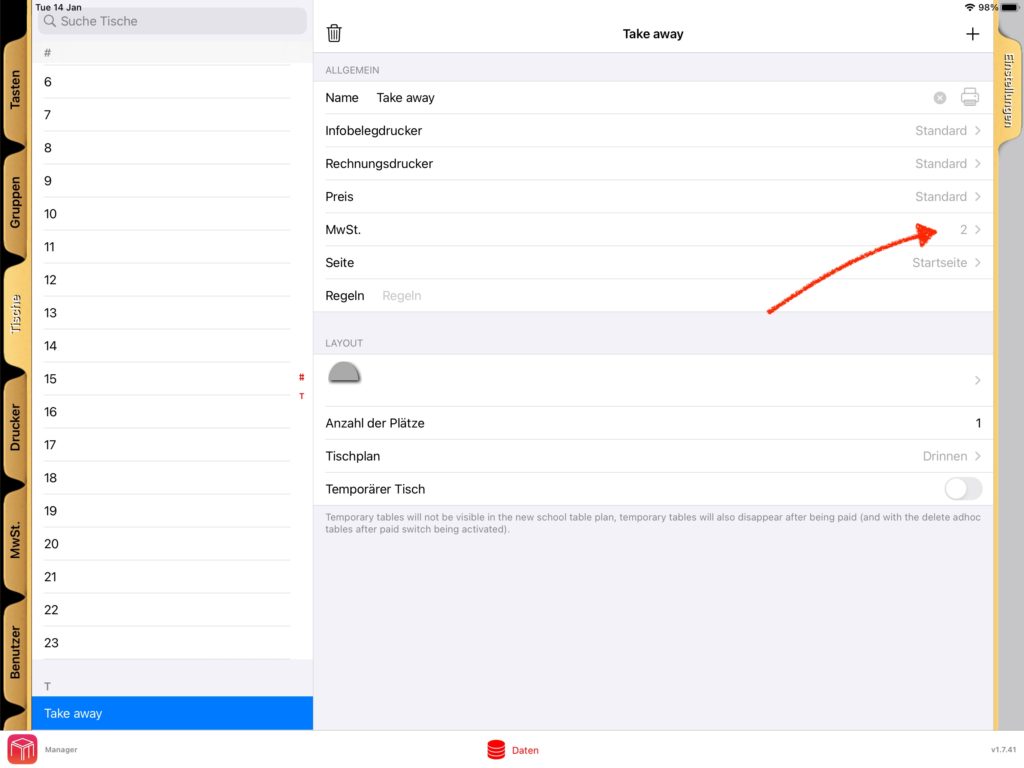
    Step 1: Configure a Table for Takeaway

    To differentiate tax rates for takeaway orders, start by creating a table specifically for takeaway sales. Once this table is set up:

    1. Assign Tax Level 2 as the tax level for this takeaway table.
    2. When you process a sale using this table, the system will automatically apply the tax rate assigned to Tax Level 2.

    This setup ensures that any sales recorded under the takeaway table will be taxed at the appropriate rate.

    Step 2: Adjusting Tax Levels for Other Tables

    If you’d prefer to reverse the setup, you can:

    1. Use Tax Level 1 for takeaway orders.
    2. Assign Tax Level 2 for all dine-in tables.

    This flexibility allows you to tailor the tax configuration to your specific business needs, ensuring accurate taxation for every scenario.

    Where to Configure These Settings

    WaiterOne’s interface provides an easy way to configure tax levels. Here are the steps:

    1. Go to the Data menu in WaiterOne.
    2. Navigate to the Groups/Tables section.
    3. Select the desired table or group and assign the appropriate tax level.
    4. Save your changes.

    Visual Guides for Configuration

    To make the process even simpler, we’ve included screenshots that illustrate how to configure these settings. These guides will help you navigate through the interface and ensure you’re setting everything up correctly.

    Why This Matters

    Managing taxes effectively is not just about compliance; it’s also about maintaining clarity in your sales reports. By leveraging WaiterOne’s tax level settings, you can:

    • Ensure accurate billing for customers.
    • Simplify your accounting processes.
    • Avoid potential errors that could lead to discrepancies.

    Conclusion

    WaiterOne’s ability to handle multiple tax levels per group or table is a powerful feature for any business that deals with both dine-in and takeaway orders. With the right setup, you can ensure smooth operations and accurate tax management.

    Have questions or need assistance? Feel free to reach out. We’re here to help you make the most of WaiterOne.

    Happy configuring!

  • Break Language Barriers with WaiterOne POS: Multilingual Support in 18 Languages

    In today’s global hospitality and retail environment, clear communication is key. Whether you’re running a local café in Amsterdam or a bustling restaurant in Bangkok, the ability to serve both staff and customers in their preferred language makes all the difference. That’s why WaiterOne POS offers powerful multilingual support, allowing you to operate smoothly across diverse markets.

    Speak Your Customer’s Language

    WaiterOne POS is equipped to run in 18 different languages, including:

    Chinese, Danish, Dutch, English, French, German, Greek, Italian, Japanese, Norwegian, Polish, Portuguese, Swedish, Russian, Serbian, Spanish, Thai, and Turkish

    This multilingual capability ensures that staff and customers alike can interact with the POS system in a way that feels natural and intuitive no confusion, no guesswork.

    A Game Changer for International Businesses

    For restaurants, cafés, and retail stores operating in multicultural or tourist-heavy areas, multilingual support is not just a bonus it’s a necessity. WaiterOne POS helps businesses:

    • Train international staff more easily
    • Enhance service speed and accuracy
    • Deliver better customer experiences
    • Build trust and loyalty across language lines

    Whether you’re running a tapas bar in Spain, a sushi counter in Japan, or a boutique in Norway, WaiterOne adapts to your team and your clientele.

    Effortless Setup, Seamless Experience

    Languages in WaiterOne POS can be set per device or per user, giving each team member the freedom to use the interface in the language they’re most comfortable with. This flexibility leads to:

    • Fewer mistakes at the point of sale
    • Faster onboarding for new staff
    • Improved team communication
    • A professional, localized service for customers

    Serve Globally, Operate Locally

    WaiterOne’s multilingual support makes it an ideal POS solution for franchise operatorsairport and hotel restaurantsinternational retail, and any business that wants to scale globally while keeping operations smooth locally.


    Ready to Go Multilingual?

    Break through language barriers and deliver world-class service, no matter where you are. Choose WaiterOne POS the smart solution for multilingual, modern businesses.

  • What’s New in WaiterOne POS for iOS 18


    Automatic E-mail Ticketing
    Tickets can now be emailed directly without manually entering the email address, improving workflow efficiency and reducing errors. This update allows front-end staff to focus more on customer service than email entry.

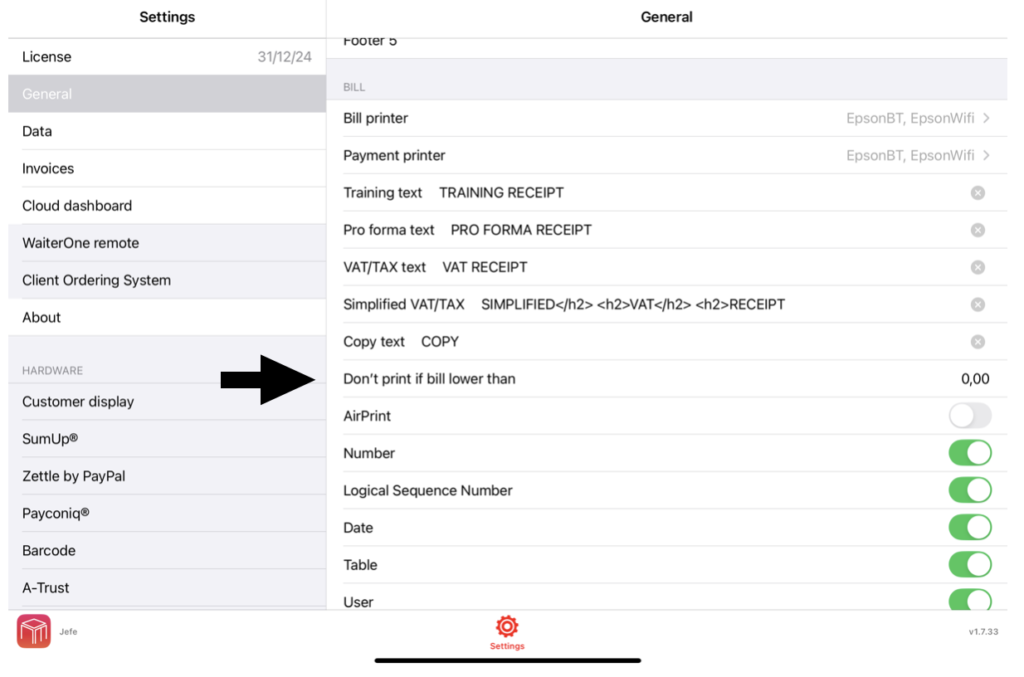
    Flexible Print Options
    WaiterOne POS offers a setting to skip bill printing for transactions below a specified amount, helping reduce paper usage and printing costs. This customizable threshold lets managers tailor billing practices to fit business and environmental goals.

    Remember you can still decide to print the bill. Just press a bit longer (> 1.2 seconds) on the bill button and the ticket will be printed (although the total is less then the minimum to print the bill). Another option is also to ask a copy of a bill, see the tickets button above the order/bill/pay main buttons.

    Improved Product Sorting
    The COS interface now sorts products with numerical names first, followed by alphabetical items. This logical order helps staff locate products faster, especially in large catalogs, improving speed and accuracy during busy hours.

    Payments and VAT/TAX in CSV
    CSV export is now available for Day Payments and Day VAT/TAX reports, allowing easy data transfer for financial analysis. This feature streamlines accounting and enhances reporting by simplifying daily transaction and tax data management.

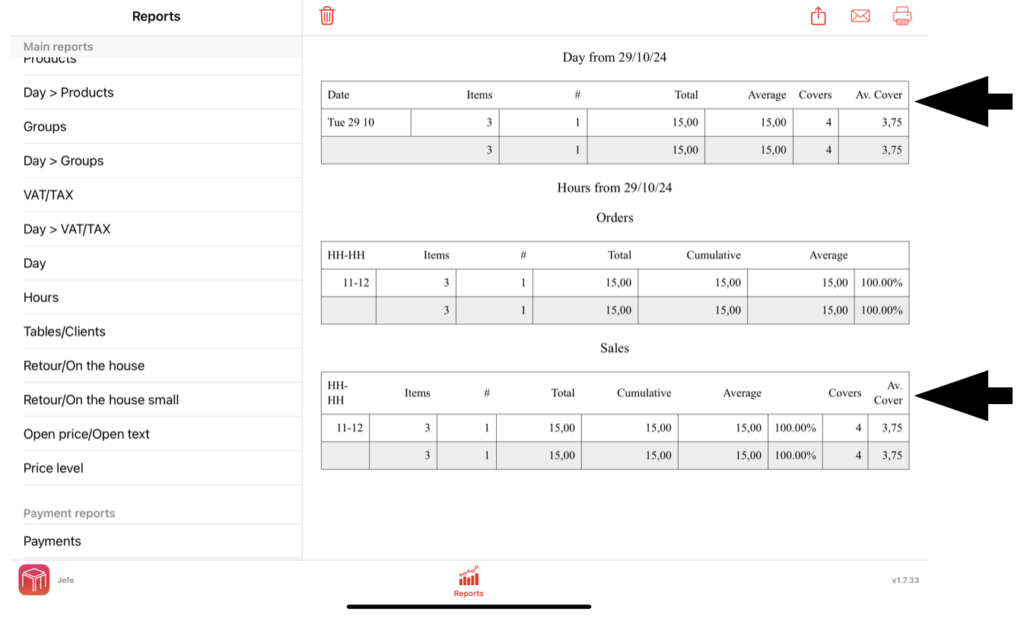
    Enhanced Reporting

    The Reports section for Day, Hours, and Tables/Clients now includes cover counts, enabling easier tracking and analysis of guest numbers. This update simplifies the assessment of dining trends, service volume, and table turnover.